Connecting a SCALEXIO Rack
Introduction
This topic show examples on how to connect a SCALEXIO rack.
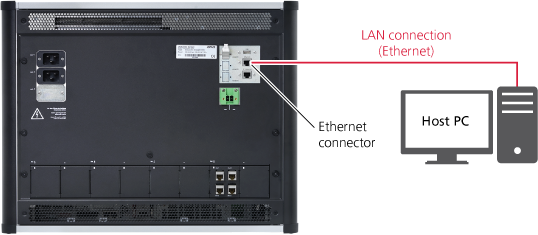
A SCALEXIO rack is connected to the host PC or network via the Ethernet (RJ45) connector on the rack's rear.
Network security
The SCALEXIO system offers interfaces for loading and executing real-time applications, for writing, reading, and measuring variables in the system's memory, and for transferring high-resolution time stamps to synchronize measurement data.
The interfaces do not offer authentication or encryption. The SCALEXIO system must therefore be used in a development network that is protected against external access. To ensure maximum security, preferably connect the SCALEXIO system to a host PC via a peer-to-peer connection. When you are using a multiprocessor system, set up a separate subnet that is only connected to the SCALEXIO systems involved and the related host PCs. By using a peer-to-peer connection or a separate subnet, the real-time requirements of the systems, for example, deterministic bandwidths, are guaranteed and possible external attack vectors on the SCALEXIO system are minimized.
Standard connection
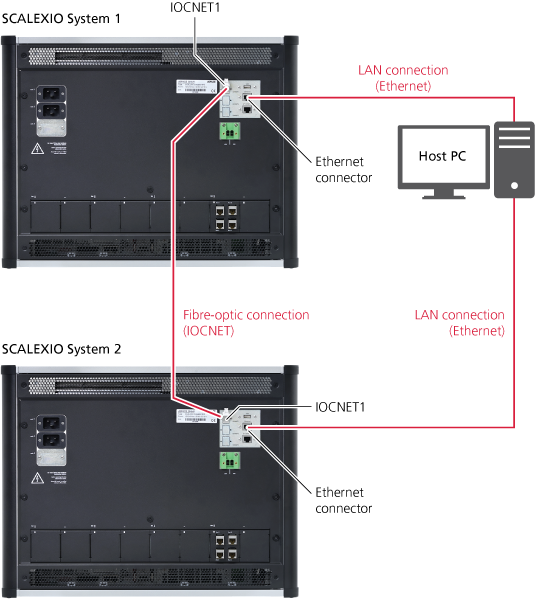
Use in a multiprocessor system
Note
The port 4 of the DS2502 IOCNET Link Board installed in the SCALEXIO Processing Unit is usually routed to the IOCNET1 connector on the SCALEXIO rack's rear.
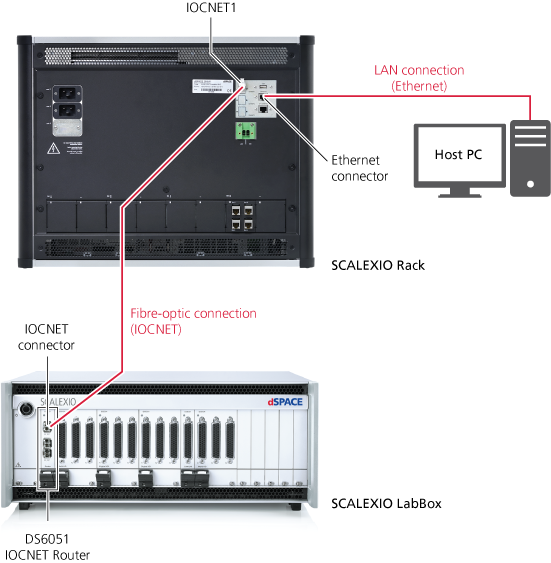
Use as root in a distributed SCALEXIO system
Note
The port 4 of the DS2502 IOCNET Link Board installed in the SCALEXIO Processing Unit is usually routed to the IOCNET1 connector on the SCALEXIO rack's rear.