Safety Precautions for Connecting SCALEXIO LabBox
Connecting external devices
To avoid risk of injury and prevent damage to the hardware:
Do not connect to the ECU/load connectors any external devices which generate voltages above the safety extra‑low voltage (SELV) limits.
Do not apply voltages/currents outside the specified ranges to the connector pins.
To prevent uncontrolled current flow, it is recommended to avoid direct connections between signal ground (KL 31) and earth ground. For details on ground potentials, refer to Ground Potentials.
The maximum potential difference between signal ground and earth ground must not exceed 10 V (max.).
Ensure that the system's I/O signals stay within the SELV limits if larger ground shifts are likely to occur.
Do not connect or disconnect any devices while the SCALEXIO system is powered up and/or external devices are switched on. Make sure that the host PC, the SCALEXIO system and external devices are turned off beforehand.
High voltages can be present at pins of the ECU/load connectors. Therefore, do not leave the connectors unconnected during operation.
To reduce the risk of damage and fire, always use approved wiring material with an appropriate cross-section, isolation, etc. for building the external cable harness. Route the external cable harness along a path that is fire-protected.
To reduce the risk of uncontrolled fire spreading, it is recommended to operate the SCALEXIO system including all external devices in a fire-protected area.
To avoid the risk of stumbling, do not lay the external cables along a route where people have to walk.
Establishing LAN connections
All the local area network (LAN) ports of a SCALEXIO system contain safety extra‑low voltage (SELV) circuits, which must be connected only to other SELV circuits.
To avoid electric shock, do not connect the LAN ports of a SCALEXIO system to non‑SELV circuits, e.g., telecommunication network voltage (TNV) circuits.
The LAN or LAN segment of a SCALEXIO system and all connected equipment must be part of the same low‑voltage power distribution system and be located within a single building.
Do not use RJ45 connectors of wide area network (WAN) ports, because WAN ports can contain TNV circuits.
When connecting external devices, e.g., an ECU, to the LAN ports of a SCALEXIO system, keep in mind that the LAN ports' shield conductors are galvanically connected to the earth ground (protective earth) of the SCALEXIO system.
To avoid a fire caused by overheated wiring due to excessive current flow in the shield conductor, do not connect LAN shield conductors to ECU housings, ECU grounds, or the signal ground of the SCALEXIO system.
LAN cables can occasionally be subject to hazardous transient voltages, such as lightning or disturbances in the electric utilities power grid. Handle exposed metal components of the network with caution.
Do not connect the RJ45 connectors of Ethernet modules that support different Ethernet standards.
Cybersecurity measures
To protect your system and any sensitive data from unauthorized access, you must implement appropriate cybersecurity measures and adhere to the latest password management standards.
You are strongly recommended to meet the following requirements with respect to data privacy standards, to reduce potential cyber risks and maintain a secure communication channel between the host PC and the HIL system.
To avoid unauthorized access to the hardware, use secure passwords for the system logon.
To avoid unauthorized access to the hardware via the network, protect the network access by adequate measures such as the use of firewalls.
To minimize the risk of unauthorized access, ensure that the system is connected to the host PC only via a direct peer-to-peer Ethernet connection.
Do not integrate the system into a shared network.
Do not use hardware connections that could expose the system to access by other devices.
Establishing RS232 and USB connections
Observe the following notes when connecting a device via RS232 or USB to a DS6001 Processor Board.
Connecting a device to the DS6001 Processor Board via RS232 or USB can bridge the SCALEXIO system ground to the earth ground (protective earth) and establish a ground loop with external devices that are connected to the SCALEXIO system.
A ground loop can cause an uncontrolled, excessive current flow in the SCALEXIO system ground which can disturb the I/O signals of the SCALEXIO system.
To avoid an excessive current flow make sure that there is no potential shift in the earth connection between the SCALEXIO system and any external device.
Handling fiber-optic cables and modules
Do not damage the fiber optics.
Handle the fiber optics with care.
Make sure that fiber-optic cables are not stretched or overstretched.
Do not bend fiber-optic cables past a radius of 40 mm.
When you unplug fiber-optic connections, handle only the connector housings and locking mechanisms. Do not pull the fiber-optic cables.
Use protective caps for all the unused ports of fiber-optic modules.
Place protective caps on the ends of unconnected fiber-optic cables. Do not touch the ends of fiber-optic cables when they are unprotected.
- Locking mechanisms of fiber-optic cables
The connectors of fiber-optic cables are assembled in pairs. These two connectors have a locking mechanism. To release the cables from a fiber-optic module, press down the latch on the connectors. Refer to the following illustration:
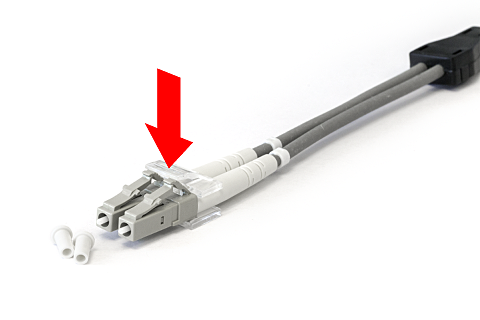
The two connectors are clipped together loosely and can shift. Make sure that the two connectors stay next to each other when you plug them into a fiber-optic module.
Connecting to the power source
Note the following points when connecting the SCALEXIO system to the power source:
According to EN 61010-01, fluctuations in the power supply voltage of up to ± 10 % of the nominal voltage are permissible.
Operate the SCALEXIO system only from the kind of power source indicated on the rear panel.
Use appropriate miniature circuit breakers with a rated current of max. 16 A.
It is recommended to connect the SCALEXIO system via residual current operated protective devices.
Always use approved power cords with an appropriate cross-section, isolation, etc. for connection to the power source.
The SCALEXIO system has protection class 1: The system must be operated with a protective earth/ground connection via the protective earth/grounding conductor of the power cord(s).
Always ensure that the system is operated from properly grounded wall outlets only.
Use multiple socket outlets only if they comply with the system's power requirements. Multiple socket outlets can cause hazardous touch currents due to the accumulation of earth leakage currents.