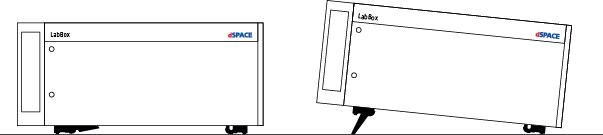
Overview of SCALEXIO LabBox (8-Slot)
Front view
The following illustration shows the front view of SCALEXIO LabBox (8-slot, desktop variant) with a DS6001 Processor Board (installed in the system slot and I/O slot 1).
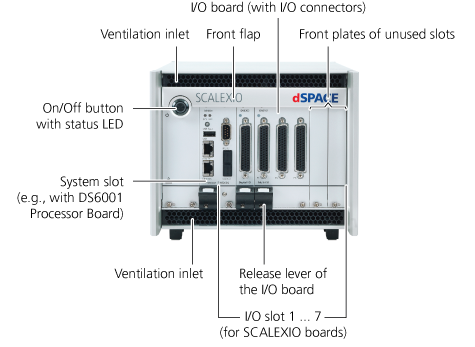
The design of the desktop variant and the rack-mount variants is identical, except for the handles and the plastic feet. The rack-mount variants of SCALEXIO LabBox have mounting brackets instead of the handles and no plastic feet to stand on.
- On/Off button with status LED
Lets you switch SCALEXIO LabBox between standby mode and operating mode.
To start the operating mode of SCALEXIO LabBox via its On/Off button, the power source switch on the rear side of the box's power supply unit must be switched on.
The integrated status LED displays the states of the SCALEXIO LabBox.
Note
Switching to standby mode can be disabled or delayed by software. Refer to System Shutdown.
- Front flap
Covers the upper fastening screws of the installed SCALEXIO I/O boards.
- System slot
Use this slot to insert a DS6051 IOCNET Router or DS6001 Processor Board. The system slot is named slot 0. If you use a DS6001 Processor Board, I/O slot 1 is also occupied by this board.
- I/O slots 1 … 7
Use these I/O slots to insert up to seven I/O boards. The slots are numbered from left to right.
Slots 3 … 7 are extended I/O slots that additionally provide support for dSPACE Ethernet boards and dSPACE-qualified CompactPCI® Serial boards as follows:
Slots 3 and 7: PCIe 2.0 x4 (up to 2000 MByte/s)
Slots 4, 5, and 6: PCIe 2.0 x1 (up to 500 MByte/s)
Note
Unused slots must be covered by front plates to ensure electromagnetic compatibility (EMC) and precise airflow for cooling.
Rear view
The following illustration shows the rear view of SCALEXIO LabBox (8-slot, desktop variant).
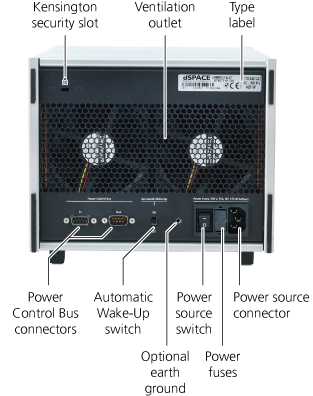
- Kensington security slot
Lets you use the Kensington lock anti-theft system and connect a security cable.
- Type label
Displays the version and the serial number of SCALEXIO LabBox among other information.
- Power control bus connectors
Lets you cascade SCALEXIO AutoBoxes/LabBoxes to power them up or down at the same time. Refer to Powering Up and Shutting Down the LabBox.
- Automatic Wake-Up switch
A switch to specify the start behavior.
On means that SCALEXIO LabBox starts the operating mode automatically when its internal power supply unit is powered up via the power source switch.
Off means that SCALEXIO LabBox is set to standby mode when its internal power supply unit is powered up via the power source switch. SCALEXIO LabBox will start the operating mode if you press the On/Off button on the front side.
Changed states of this switch take effect only after SCALEXIO LabBox was powered down completely and powered up again.
- Optional earth ground
Lets you connect an additional earth ground if you install SCALEXIO LabBox in a SCALEXIO rack (M4 press nut or M4 press nut with preassembled blade receptacle).
- Power source switch
Connects or disconnects the internal power supply to or from the external power source. For details, refer to Powering Up and Shutting Down the LabBox.
- Power fuses
Two power fuses (5 × 20 mm, T 5 A).
- Power source connector
Connects the LabBox to the power source.
Clearances
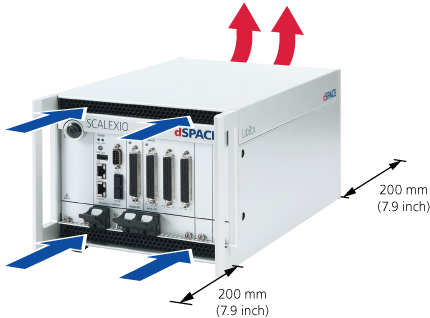
Do not block the ventilation inlets and outlets of SCALEXIO LabBox. For sufficient heat dissipation and free airflow, observe the minimum clearance of 200 mm (7.9 in) to walls, other devices or objects in front of and behind these openings.
Placement
The desktop variant of SCALEXIO LabBox has front feet with tilt legs on the bottom that let you stand SCALEXIO LabBox up.