Step 3: How to Write Your Own RTT Sequences and Loader Scripts
Objective
In this step, you will learn how to write your own RTT sequence in the Python programming language and to start the RTT sequence with a loader script.
Basics
- RTT sequences
An RTT sequence is implemented in the Python programming language. It is executed together, interleaved with the simulation application on the simulation platform.
Usually, an RTT sequence is not executed completely in one sampling step. The execution normally spans several sampling steps. With a
yieldstatement, an RTT sequence can be suspended in one sampling step and it can be resumed in the next sampling step. The essential point is that the values of all variables are retained and the script continues directly after theyieldstatement.
- Main generator function
Each RTT sequence must have one
MainGenerator()function, which is the topmost entry point of the RTT sequences and organizes the functionality of the entire RTT sequence at a high level. The function is called by the Python interpreter when an RTT sequence is started. AMainGenerator()function must have at least oneyieldstatement.
- Functionality of the RTT sequence
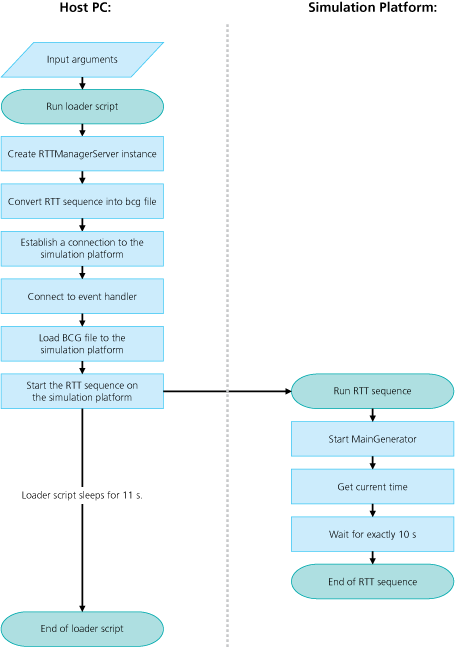
The functionality of the RTT sequence is the same as in the first step. Your RTT sequence will write two messages with a time interval of 10 s.
The following illustration shows the temporal sequence of actions that are executed on the host PC in the loader script and the actions that are executed on the simulation platform in the RTT sequence:
- Loader scripts
A loader script is implemented in the Python programming language and runs on the host PC. With a loader script, you can create and start RTT sequences on your simulation platform.
Your loader script must provide the following components:
Creating an instance of the Real-Time Test Manager Server interface.
Converting the RTT sequence into a signed byte code generator (BCG) file.
Establishing a connection to the simulation platform.
Initializing the sequence event handling.
Loading the signed BCG file to the simulation platform.
Starting the RTT sequence.
Using a loader script instead of the Real-Time Test Manager has the following advantages:
You can control and manage several RTT sequences at once.
You can start RTT sequences with sequence arguments.
You can download large files to the simulation platform in the initialization phase of the RTT sequence.
You can implement event handling for events triggered by the RTT sequences.
Tip
Only the RTT sequence and imported user modules are running on the simulation platform. The loader script, which is required for downloading and managing the RTT sequence, runs on the host PC. To clarify this difference, you will use appropriate subfolders for all scripts.
Preconditions
Python must be installed on your host PC as well as a Python editor, for example, IDLE.
Part 1: To write your own RTT sequence
In the File Explorer, create your own
Work folder, to save all files used for the RTT Tutorial. For example:<Documents folder>\00_Tutorial\You have created your own
Work folder.Navigate to your
Work folderand create the following subfolders:…\Lesson1Step3\SimulationPlatform\Open your preferred Python editor and create a new Python script.
Copy the following code to your Python editor:
""" File: RTTSequence.py Destination: Simulation platform Description: Write two messages with a delay of 10 s. """# Importing rttlib.utilities, which provides functions for common real-time # operations. from rttlib import utilities # To return a variable object with the current time. The object must be called # in the initialization phase of a module. currentTime = utilities.currentTime # Identifier for RTT print messages. rttPrefix = r" *RTT:* "#----------------------------------------------------------------------------- # MainGenerator function #----------------------------------------------------------------------------- def MainGenerator(): """ Organizes the functionality of the entire RTT sequence at a high level. Description: The MainGenerator() function is called by the Python interpreter after the initialization phase when periodic execution begins. Each RTT sequence must have one MainGenerator() function. The name of the function is mandatory because it is the defined entry point for the script scheduler. """print(rttPrefix + "Start of real-time test execution on target platform") # Read value from the simulation application. startTime = currentTime.Value # Write current time. print(rttPrefix + "currentTime.Value = %.3f" % currentTime.Value) print(rttPrefix + "Wait for 10 seconds. ")# A MainGenerator() function must have at least one yield statement. This # allows the execution of an RTT sequence to be distributed over several # sampling steps. # If you start the Wait() generator function with a yield statement, the # execution of the RTT sequence is suspended until the specified number # of seconds has passed. The condition is checked in each simulation step. # # Note: If you start the Wait() generator function without the yield # statement, the RTT sequence is not suspended, and the condition is # checked only once in the first simulation step. yield utilities.Wait(10.0)# Write current time again at the end of the while loop. print(rttPrefix + "currentTime.Value = %.3f" % currentTime.Value) # Write the end of the RTT sequence. print(rttPrefix + "End of real-time test execution.") yield NoneExamine the copied code. The code contains a ready-to-use Python script enhanced with several comments to explain the code.
Save the file as:
…\SimulationPlatform\RTTSequence.py.
Interim result
You have written your first RTT sequence, which has the same functionality as the demo RTT sequence from step 1. Continue with the next part to write your own loader script.
Part 2: To write your own RTT loader script
In the File Explorer, navigate to your
Work folderand create the following subfolder:…\Lesson1Step3\HostPC\Create a new Python script.
Copy the following code to the Python editor:
""" File: RTTLoader.py Destination: Host PC Description: To load and start the RTT sequence. """ # This Python library is used to handle the test script download. import rttmanagerlib # Use the standard Python built-in libraries for operation-system commands. import pathlib import time # Get the path of your RTT sequence. workingDir = pathlib.Path(__file__).parent.parent.resolve() testScriptName = str(workingDir / "SimulationPlatform" / "RTTSequence.py") # Import rttdemoutilities to implement event handling. The file contains # the 'RTTMSequencesEvents' and 'RTTMVariablesEvents' event classes. import rttdemoutilitiesdef executeDemo(boardName): """ Executes the Real-Time Testing demo. """ # Create new RTTManagerServer instance rttManager = rttmanagerlib.RealTimeTestManagerServer() # Convert the RTT sequence into a signed byte code generator (BCG) file bcgFileName = rttManager.BCGServiceProvider.Generate(testScriptName,[]) # Establish the real-time platform connection board = rttManager.AccessBoard(boardName) # Connect to the sequences events handle sequencesEvents = rttdemoutilities.RTTMSequencesEvents(board.Sequences) # Load a sequence to the real-time platform sequence = board.Sequences.Create(bcgFileName) # Start the sequence on the real-time platform sequence.Run() # Suspend host script for the execution time of the RTT script numberOfSeconds = 11 time.sleep(numberOfSeconds)#----------------------------------------------------------------------------- # Main program #----------------------------------------------------------------------------- # The executeDemo() function must be started with an argument, which depends # on your simulation platform. boardName = input('# The variable "boardName" depends on your ' 'simulation platform. \n' '# - MicroAutoBox II: \n' '# boardName = <platform name> \n' '# -> e.g. ds1401 \n' '# - MicroLabBox, MicroLabBox II, MicroAutoBox III, \n' '# DS6001, and SCALEXIO:\n' '# boardName = <IP address/name of ' 'simulation application> \n' '# -> e.g. 192.168.0.15/turnlamp \n' '# - VEOS: \n' '# boardName = <IP address/name of ' 'simulation application> \n' '# -> e.g. 127.0.0.1/turnlamp \n' '\n' 'Enter "boardName" according to the list above: ') executeDemo(boardName)Save the file as:
…\HostPC\RTTLoader.py.
Interim result
You have written your first loader script. Continue with the next part to start your RTT sequence.
Part 3: To start your own RTT sequence with a loader script
Open your loader script.
Start the loader script.
Enter a value for
boardNameas described in the loader script.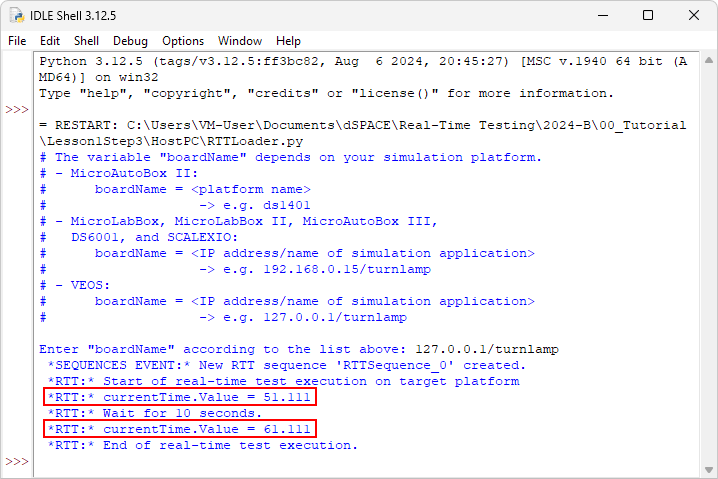
You have successfully started your own RTT sequence with a loader script.
Result
In this step you have learned:
To write your own RTT sequence.
To write your own loader script.
To start your RTT sequence with a loader script.
What’s next
In the next step, you will manage RTT sequences with loader scripts.