Step 3: How to Implement an Observer Function
Objective
In this step, you will learn how to implement an observer function to check whether the warning light in the simulation application is flashing synchronously or not.
Basics
- Observer
You can automate the evaluation of a test case with an observer function. The observer function checks in each simulation step if a certain condition is fulfilled.
In this step, you will implement an observer function in a second Python module with the name:
myUtilities.py.
- Functionality of the RTT sequence
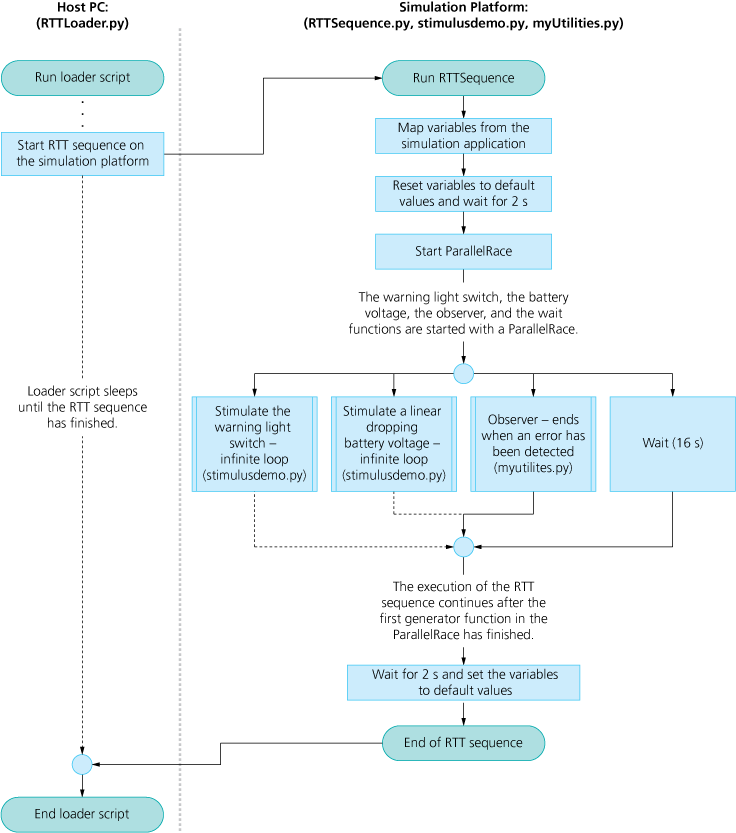
In this step, your RTT sequence will have the following functionality:
Stimulate the warning light switch.
Stimulate the battery voltage with a linear function. The voltage drops from 12 V to 7 V.
Your observer function checks continuously if the warning light is flashing synchronously.
The test ends when the warning light has flashed synchronously for 16 s or when non-synchronous flashing is detected.
View the following illustration for more details:
- Parts
This step is divided into the following parts:
myUtilities.py: To write a Python module with utilities for the RTT sequence, refer to Part 1.stimulusdemo.py: To write the Python module , refer to Part 2.RTTSequence.py: To write an RTT sequence for this step, refer to Part 3.RTTLoader.py: To write a loader script for this step, refer to Part 4.To start the RTT sequence, refer to Part 5.
Part 1: To implement an observer function
In the File Explorer, navigate to your
Work folderand create the following subfolders:…\Lesson2Step3\SimulationPlatform\…\Lesson2Step3\HostPC\
Create a new Python script.
Copy the following code to the Python editor:
""" File: myUtilities.py Destination: Simulation platform Description: To implement an observer function and other utilities. """ # Module imports from rttlib import utilities # Module global variables currentTime = utilities.currentTime# Use deques instead of lists to make the data real-time capable. from collections import deque # Identifier for RTT print messages. rttPrefix = r" *RTT:* " # Possible test states: testSuccess = 1 testUndefined = 0 testFailure = -1# ---------------------------------------------------------------------------- # Generator functions # ---------------------------------------------------------------------------- def frontRearObservatorGen(signalFront, signalRear, UBattery, sequenceResult): """ Checks if the front and rear signals are flashing synchronously. Parameters: signalFront : A model variable for the front signal. signalRear : A model variable for the rear signal. UBattery : A model variable for the battery voltage. sequenceResult: A deque for the test result. Description: Checks if the warning light is flashing synchronously. """# Infinite while loop. Each iteration consists of a complete # watch-detect-validate cycle. while(1): # Check if states of the front and the rear signal are different. signalDifference = signalFront.Value - signalRear.Value if signalDifference: # Wait for the next generator loop. yield None # If the front and rear signals differ, wait for 50 ms. yield utilities.Wait(0.05) # Start a validation loop and check for the next 100 ms # whether all signals have the same value or not. startValidation = currentTime.Value while currentTime.Value < startValidation + 0.1: # Wait for the next generator loop. yield None# Check if states of the front and rear signals are different signalDifference = signalFront.Value - signalRear.Value # If the signal values are different, the test has failed. if signalDifference: print(rttPrefix + "----Test failed----: " + "Signal difference detected") print(rttPrefix + "----Test failed----: " + "at U_Battery = %.1f V" % UBattery.Value) # Write the test result to the sequenceResult deque. sequenceResult[0] = testFailure return yield None yield NoneSave the file as:
…\Lesson2Step3\SimulationPlatform\myUtilities.py.
Interim result
You have implemented an observer function into the Python module myUtilities.py. Continue with the next part to write the Python module stimulusdemo.py.
Part 2: To write the stimulusdemo module
Create a new Python script.
Copy the following code to the Python editor:
""" File: stimulusdemo.py Destination: Simulation platform Description: Generator functions to stimulate variables from the simulation application """ # Provides functions for common real-time operations. from rttlib import utilities # Module global variables. stepSize = utilities.modelStepSize# ---------------------------------------------------------------------------- # Generator functions to stimulate variables from the simulation application. # ---------------------------------------------------------------------------- def constGen(var, constValue): """ Stimulates a variable with a constant value. Parameters: var : Variable to be stimulated. constValue: Constant value of the signal. """ # This generator function runs until it is terminated externally, for # example, by a ParallelRace generator function. while (1): # Start the stimulation of the variable. var.Value = constValue yield Nonedef rampGen(var, offset, slope, limit): """ Stimulates a variable with a linear equation. Description: The function generates a signal according to the equation: var(t) = offset + slope * t Parameters: var : Variable to be stimulated. offset: Initial value of the signal. slope : Signal change per second. limit : Saturation value. """ # Initialize local variables. time = 0.0 # Get model step size. timeToAdd = stepSize.Value # This generator function runs until it is terminated externally, for # example, by a ParallelRace generator function. while (1): # Linear equation to get the ramp value. value = offset + (slope * time) # Check limits if ( (slope > 0) and (value > limit)\ or (slope < 0) and (value < limit)): # Overwrite calculated value value = limit # Start the stimulation of the variable. var.Value = value # Increase the time by one sampling step. time += timeToAdd yield NoneSave the file as:
…\Lesson2Step3\SimulationPlatform\stimulusdemo.py.
Interim result
You have written the Python module stimulusdemo.py. The generator functions in this module are now implemented as infinite loops without break condition. The generator functions are terminated externally, for example, by a ParallelRace(). Continue with the next part to write an RTT sequence.
Part 3: To write an RTT sequence with an implemented observer function
Create a new Python script.
Copy the following code to the Python editor:
""" File: RTTSequence.py Destination: Simulation platform Description: Stimulation of the warning light switch and the battery voltage. An observer function checks in parallel the functionality of the warning light. """ # Provides functions for common real-time operations. from rttlib import utilities # Import the variable module from the rttlib package. from rttlib import variable # Import scheduler to use ParallelRace(). from rttlib import scheduler# Import your Python modules. import stimulusdemo import myUtilities # Create variable objects for accessing simulation application. WarningLightSwitch = variable.Variable( r'Model Root/WarningLightSwitch[0|1]/Value') BatteryVoltage = variable.Variable(r'Model Root/BatteryVoltage[V]/Value') # To shorten the script only the lights on the left side are investigated. FL = variable.Variable(r'Model Root/FrontLightEcu/TurnSignalLeft') RL = variable.Variable(r'Model Root/RearLightEcu/TurnSignalLeft') # Identifier for RTT print messages. rttPrefix = r" *RTT:* "# Possible test states: testSuccess = 1 testUndefined = 0 testFailure = -1 # Use deques instead of lists to make the data real-time capable. from collections import deque sequenceResult = deque([testUndefined])#----------------------------------------------------------------------------- # Generator functions #----------------------------------------------------------------------------- def resetGen(): """ Set the variables from the simulation application back to default values. """ WarningLightSwitch.Value = 0 BatteryVoltage.Value = 12.0 yield Nonedef stimulateWarningLightSwitchGen(): """ Stimulates the warning light switch. """ yield stimulusdemo.constGen(WarningLightSwitch, 1)def stimulateBatteryVoltageGen(): """ Stimulates the battery voltage with a linear equation. """ # Battery voltage at the start of the generator function startVoltage = 12.0 # Battery voltage at the end endVoltage = 7.0 # Voltage change per second slope = -0.334 yield stimulusdemo.rampGen(BatteryVoltage, startVoltage, slope, endVoltage)def ObserverGen(): """ Observer function to check if the warning light is flashing synchronously. """ yield myUtilities.frontRearObservatorGen(FL, RL, BatteryVoltage, sequenceResult)# ---------------------------------------------------------------------------- # MainGenerator function # ---------------------------------------------------------------------------- def MainGenerator(): """ Main generator function of the RTT sequence. """ print(rttPrefix + "Start of real-time test execution on target platform") numberOfSeconds = 16 # Setting default values before the test starts. yield resetGen()# Suspending the RTT sequence to avoid malfunctions if the battery voltage # was very low before the reset. yield utilities.Wait(2) print(rttPrefix + "Switch on the 'Warning Light Switch' and watch for" + " signal differences. In parallel the 'Battery Voltage' drops.") yield None# Start all generator functions with ParallelRace(). The ParallelRace will # end if numberOfSeconds is reached or the observer has detected a # failure. yield scheduler.ParallelRace(stimulateWarningLightSwitchGen(), stimulateBatteryVoltageGen(), ObserverGen(), utilities.Wait(numberOfSeconds)) # If the sequenceResult is still testUndefined, the ObserverGen has not # found any errors. if sequenceResult[0] == testUndefined: print(rttPrefix + "----Test passed----") yield utilities.Wait(2) yield resetGen()Save the file as:
…\Lesson2Step3\SimulationPlatform\RTTSequence.py.
Interim result
You have written an RTT sequence with an implemented observer function. Continue with the next part to write a loader script.
Part 4: To write a loader script
Copy the loader script from the previous step:
…\Lesson2Step2\HostPC\RTTLoader.py.Paste the loader script into the folder:
…\Lesson2Step3\HostPC\.
Interim result
You have written a loader script for this step. Continue with the next part to start your RTT sequence.
Part 5: To start the RTT sequence
Open ControlDesk.
On the Home ribbon, click Status Control – Start Measuring.
ControlDesk globally starts measurement for the platform.
Start your loader script located in:
…\HostPC\RTTLoader.py.You can compare your results with the following animated graphic:
Result
In this step you have learned:
To create an additional Python module, which includes an observer function.
To automate the test evaluation with an observer function.
What’s next
In the next step, you will start RTT sequences with sequence arguments.