Step 5: How to Start Several Generator Functions in Parallel
Objective
In this step, you will learn how to start several generator functions in parallel.
You will use the generator functions:
Parallel()ParallelRace()
Basics
- Parallel()
You can execute several generator functions in parallel. All generator functions that are part of a
Parallel()construct are calculated in each simulation step. If you use theParallel()generator function, the part of the RTT sequence containing theParallel()function continues only when all the embedded generator functions have finished.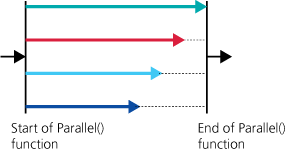
- ParallelRace()
If you use the
ParallelRace()generator function, the execution of the RTT sequence continues after the first of the embedded generator functions has finished.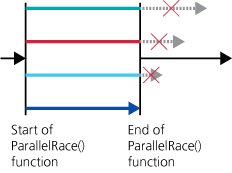
- Functionality of the RTT sequence
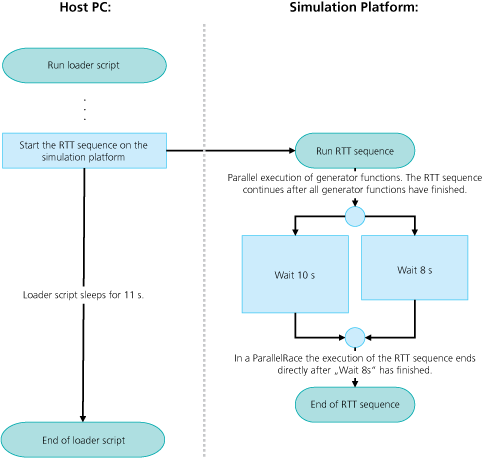
Two additional generator functions are included in the RTT sequence:
Wait08sGen(): Prints the current time at the start of the generator function and again after 8 s.Wait10sGen(): Prints the current time at the start of the generator function and again after 10 s.
Both generator functions are started with
Parallel()andParallelRace().
View the following illustration for more details:
Part 1: To write a loader script for this step
In the File Explorer, navigate to your
Work folderand create the following subfolders:…\Lesson1Step5\SimulationPlatform\…\Lesson1Step5\HostPC\
Create a new Python script.
Copy the following code to the Python editor:
""" File: RTTLoader.py Destination: Host PC Description: To load and start the RTT sequence. """ # This Python library is used to handle the test script download. import rttmanagerlib # Use the standard Python built-in libraries for operation-system commands. import pathlib import time # Get the path of your RTT sequence. workingDir = pathlib.Path(__file__).parent.parent.resolve() testScriptName = str(workingDir / "SimulationPlatform" / "RTTSequence.py") # Import real-time testing demo utilities. import rttdemoutilitiesdef executeDemo(boardName): """ Executes the Real-Time Testing demo. """ # Create new RTTManagerServer instance rttManager = rttmanagerlib.RealTimeTestManagerServer() # Convert the RTT sequence into a signed byte code generator (BCG) file bcgFileName = rttManager.BCGServiceProvider.Generate(testScriptName,[]) # Establish the real-time platform connection board = rttManager.AccessBoard(boardName) # Connect to the sequences events handle sequencesEvents = rttdemoutilities.RTTMSequencesEvents(board.Sequences) # Load a sequence to the real-time platform sequence = board.Sequences.Create(bcgFileName) # Start the sequence on the real-time platform sequence.Run() # Suspend host script for the execution time of the RTT script numberOfSeconds = 11 time.sleep(numberOfSeconds)# ---------------------------------------------------------------------------- # Main program # ---------------------------------------------------------------------------- """ The executeDemo() function must be started with an argument which depends on your simulation platform. Use the same input as in Lesson 1, Step3. """ boardName = "127.0.0.1/turnlamp" executeDemo(boardName)Save the file as:
…\HostPC\RTTLoader.py.
Interim result
You have created a loader script for this step. Continue with the next part to start generator functions with Parallel().
Part 2: To write an RTT sequence to start generator functions with Parallel()
Create a new Python script.
Copy the following code to the Python editor:
""" File: RTTSequence.py Destination: Simulation platform Description: Starting generator functions with Parallel(). """# Import rttlib.utilities, which provides functions for common real-time # operations. from rttlib import utilities # Import rttlib.scheduler, which provides functions to execute concurrent # operations in an RTT sequence. from rttlib import scheduler # To return a variable object with the current time. currentTime = utilities.currentTime # Identifier for RTT print messages. rttPrefix = r" *RTT:* "# ---------------------------------------------------------------------------- # Generator functions #----------------------------------------------------------------------------- def Wait08sGen(): """ Writes two messages with a time interval of 8 s. Description: Definition of an additional generator function. Add "Gen" to the end of the function name to show that it is a generator function. """ # Write current time startTime = currentTime.Value print(rttPrefix + "start of (Wait08sGen) = %.3f" % currentTime.Value) # Suspends the RTT sequence for the specified time. yield utilities.Wait(8.0) # Write time at the end of the generator function print(rttPrefix + "currentTime (Wait08sGen) = %.3f" % currentTime.Value)def Wait10sGen(): """ Writes two messages with a time interval of 10 s. """ # Write current time startTime = currentTime.Value print(rttPrefix + "start of (Wait10sGen) = %.3f" % currentTime.Value) # Suspends the RTT sequence for the specified time. yield utilities.Wait(10.0) # Write time at the end of the generator function print(rttPrefix + "currentTime (Wait10sGen) = %.3f" % currentTime.Value)# ---------------------------------------------------------------------------- # MainGenerator function #----------------------------------------------------------------------------- def MainGenerator(): """ Main generator function of the RTT sequence. """ print(rttPrefix + "Start of real-time test execution on target platform") # Pay attention to start generator functions with a prefixed yield. All # parameters of the Parallel() generator must be generator functions, too. print(rttPrefix + "Wait08sGen and Wait10sGen started with Parallel()") yield scheduler.Parallel(Wait08sGen(), Wait10sGen()) # Write the end of the RTT sequence. print(rttPrefix + "End of real-time test execution.")Save the file as:
…\SimulationPlatform\RTTSequence.py.Start your loader script located in:
…\HostPC\RTTLoader.py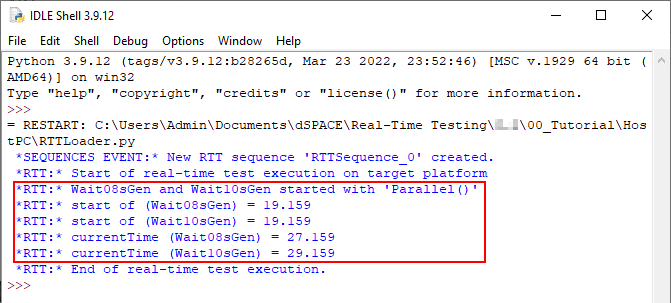
You have started two generator functions concurrently with
Parallel(). The execution of the RTT sequence continues after all embedded generator functions in Parallel() have finished.
Interim result
You have learned how to start more than one generator function at once with Parallel(). Continue with the next part to start the generator functions with ParallelRace().
Part 3: To write an RTT sequence to start generator functions with ParallelRace()
Open your RTT sequence again:
…\SimulationPlatform\RTTSequence.py.Replace the existing code with:
""" File: RTTSequence.py Destination: Simulation platform Description: Starting generator functions with ParallelRace(). """# Provides functions for common real-time operations. from rttlib import utilities # Provides functions to execute concurrent operations in an RTT sequence. from rttlib import scheduler # To return a variable object with the current time. currentTime = utilities.currentTime # Identifier for RTT print messages. rttPrefix = r" *RTT:* "# ---------------------------------------------------------------------------- # Generator functions #----------------------------------------------------------------------------- def Wait08sGen(): """ Writes two messages with a time interval of 8 s. """ # Write current time startTime = currentTime.Value print(rttPrefix + "start of (Wait08sGen) = %.3f" % currentTime.Value) # Suspends the RTT sequence for the specified time. yield utilities.Wait(8.0) # Write time at the end of the generator function print(rttPrefix + "currentTime (Wait08sGen) = %.3f" % currentTime.Value)def Wait10sGen(): """ Writes two messages with a time interval of 10 s. """ # Write current time startTime = currentTime.Value print(rttPrefix + "start of (Wait10sGen) = %.3f" % currentTime.Value) # Suspends the RTT sequence for the specified time. yield utilities.Wait(10.0) # Write time at the end of the generator function print(rttPrefix + "currentTime (Wait10sGen) = %.3f" % currentTime.Value)# ---------------------------------------------------------------------------- # MainGenerator function #----------------------------------------------------------------------------- def MainGenerator(): """ Main generator function of the RTT sequence. """ print(rttPrefix + "Start of real-time test execution on target platform") print(rttPrefix + "Wait08sGen and Wait10sGen started with " + "ParallelRace()") # All parameters of the ParallelRace() generator must be generator # functions, too. yield scheduler.ParallelRace(Wait08sGen(), Wait10sGen()) # Write the end of the RTT sequence. print(rttPrefix + "End of real-time test execution.")Save the file as:
…\SimulationPlatform\RTTSequence.py.Start your loader script located in:
…\HostPC\RTTLoader.py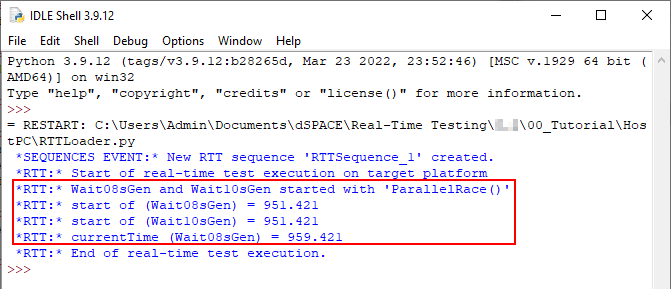
You have started two generator functions concurrently with
ParallelRace(). The second message of theWait10sGenis missing. The ParallelRace terminates all other embedded generator functions when the first generator function has finished.
Result
You have learned how to implement several generator functions in one RTT sequence. Additionally, you have started the embedded generator functions concurrently using Parallel() and ParallelRace().
What’s next
In the next step, you will use global variables.