Structure of the TurnSignalTests
Introduction
In this topic, you will learn how the TurnSignalTests are structured. You will also learn which Python scripts are required and how they interact with each other.
Python scripts on the host PC
The following Python scripts are required on the host PC. For a detailed description of the functionalities, view the descriptions in the Python scripts themselves.
- RTTTurnSignalTests
Loader script for the TurnSignalTests.
- rttfailuremessages
The module contains a dictionary with failure messages. To save computation time, only the key of a failure message is sent from an RTT sequence to the host PC. The key can be translated on the host PC to get the full error message.
- rttturnsignalreport
The module contains classes which are required for storing sequence results and writing a test report:
RTTSequenceResultTestReport
- rttturnsignalutilities
The module contains classes, functions, and dictionaries required on the host PC:
turnsignaltestsRTTMSequencesEventHandlergetTestsForExecutionloadSequencecleanUpSequencewaitForSequenceFinished
Python scripts on the simulation platform
The following Python scripts are required on the simulation platform. For a detailed description of the functionalities, view the descriptions in the Python scripts themselves.
- RTT_T010_TurnSignalLeft, … , RTT_T090_EngineStartPhaseTest
Different RTT sequences for the TurnSignalTests demo.
- commonlibs\commonutilities
This module contains different classes and functions used in the RTT sequences. The contents of the modules are independent from the turn signal model:
RTTTestFailureExceptionRTTTestUndefinedExceptionTestResultdebugPrintincreaseTimerGenwaitGennStateWobbleGenerator
- commonlibs\signalmapping
The module contains the dictionary
signalMapto map alias names to model variables.
- commonlibs\modelvariables
In this module, only the alias names from
signalmapping.pyare used to create variable objects. If a model variable is renamed, it is sufficient to change the path insignalmapping.py.
- commonlibs\turnsignalutilities
This module contains different functions for the TurnSignalTests:
isSignalSwitchedOffGenisSignalSwitchedOnGenisSignalFlashingGencheckAllSignalsSwitchedOffGensetInitialStateGenengineStartVoltageCharacteristicGeneratorwarningLightPriorityObservatorGenwarningLightActivationObservatorGen_SinglePulsePatternObservatorGenpulsePatternObservatorGenfrontRearSynchronicityObservatorGen
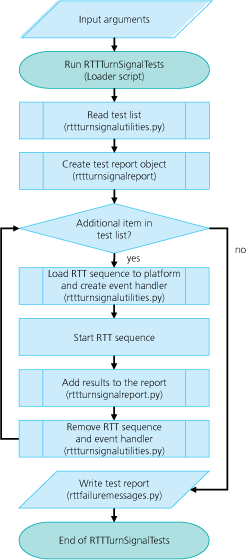
Flowchart – host PC
View the following illustration to understand the program flow of the loader script:
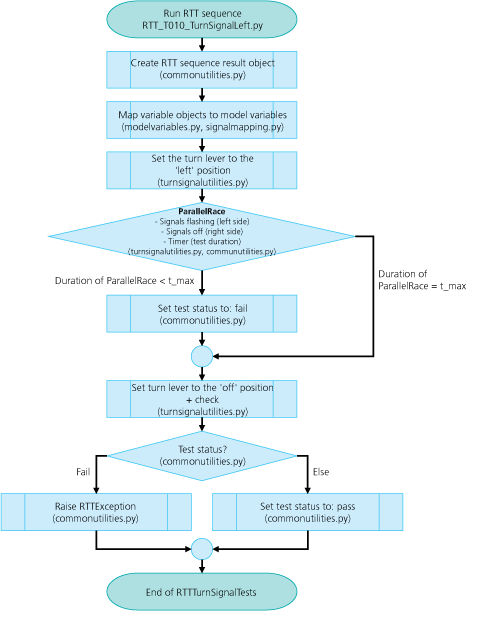
Flowchart – simulation platform
View the following illustration to understand the program flow of the RTT sequence RTT_T010_TurnSignalLeft:
What’s next
In the next step, you will learn how to start the TurnSignalTests.