Step 2: How to Manage Multiple RTT Sequences with the Real-Time Test Manager
Objective
In this step, you will manage multiple RTT sequences with the Real-Time Test Manager.
Basics
- Parameter
You can use the Real-Time Test Manager to specify run parameters for RTT sequences.
Parameter
Description
Channel
Time when the RTT sequence is executed in each sampling step.
PreComputation: The RTT sequence is executed before the simulation model is calculated by the simulation application.PostComputation: The RTT sequence is executed after the simulation model is calculated by the simulation application.
Priority
Priorities for RTT sequences can be set in a range from 1 to 256, where 1 is the highest priority. This can be important if several interdependent RTT sequences are running simultaneously.
Description
User-defined description of the RTT sequence
- Managing
The Real-Time Test Manager can be used to manage created RTT sequences.
Parameter
Description
Run/Pause/Continue/Stop
Basic commands for managing RTT sequences
Reload
Deletes the RTT sequence from the simulation platform and generates a new BCG file. Afterwards the BCG file is downloaded to the simulation platform in the New state.
Delete
Deletes the RTT sequence from the simulation platform.
Copy Error Text
Copies the text of an error message if an RTT sequence has finished with an error.
Open
Opens the RTT sequence in the default Python editor.
- Interactions
Managing RTT sequences and changing the status of RTT sequences does not affect the simulation application.
Method: To manage multiple RTT sequences with the Real-Time Test Manager
Open the Create Sequence dialog and select the file:
<documents folder>\01_GettingStarted\RTTSequences\RTTSequence.py.Set the Priority to 2 and enter a short description for the RTT sequence.
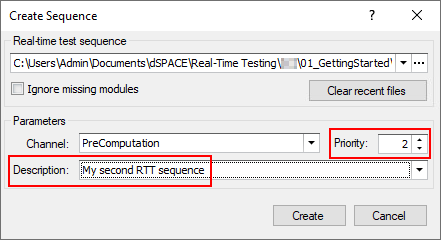
Click Create.
You have created a second RTT sequence.
Repeat the previous steps to create a third RTT sequence but set the priority again to 1.
You have created a third RTT sequence.
In the Sequences list, open the context menu of the header.
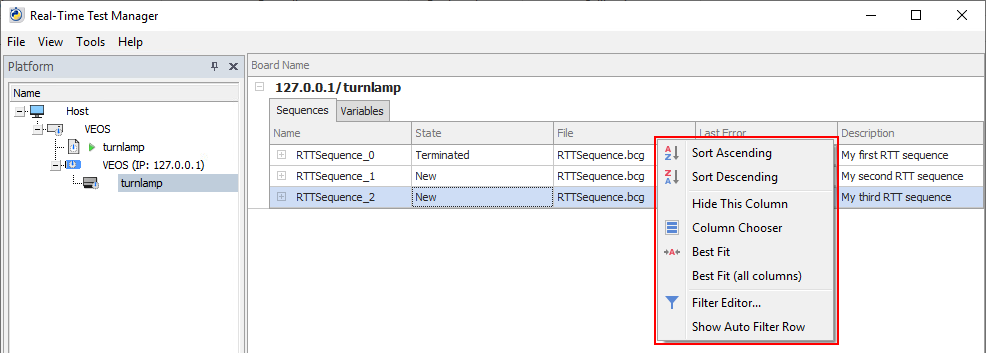
Click Column Chooser.
The Customization window opens.
Double-click Priority.
You have added the priority column to the Sequences list.
Click Priority.
You have sorted the Sequences list in ascending order by Priority.
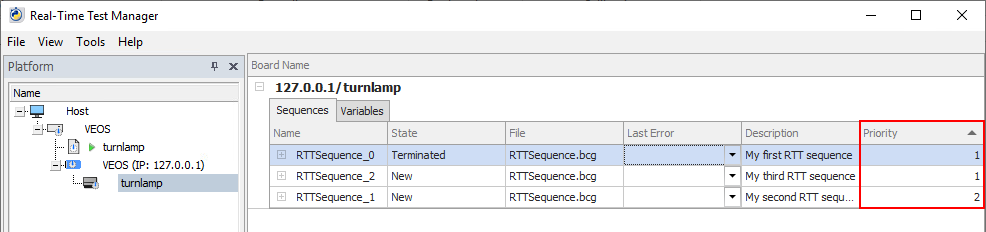
You can start or manage more than one RTT sequence at once.
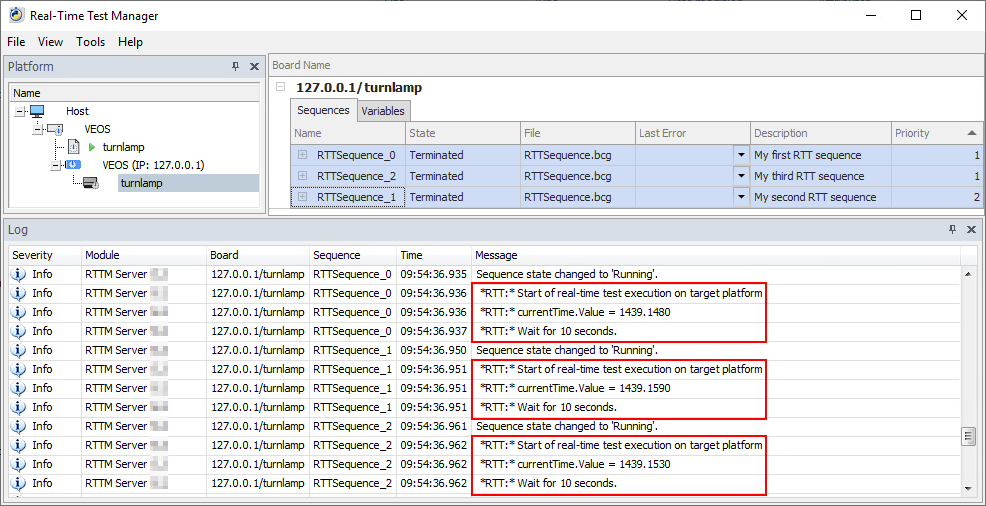
Hold down the Ctrl key and select all RTT sequences.
Open the context menu and select Run.
The RTT sequences are started in the same order as listed in the Sequences list. The Real-Time Test Manager cannot start all RTT sequences in the same sampling step. Instead, the RTT sequences are started subsequently. With a step size of 1 ms, approximately 5 to 6 simulation steps are required to start the next RTT sequence.
Result
You have learned how to create and manage multiple RTT sequences at once using the Real-Time Test Manager.
What’s next
In the next step, you will write your own RTT sequence and loader script.