Step 2: How to Transmit and Receive Ethernet Raw Frames via RTT
Objective
In this step, you will write an RTT sequence to transmit and receive Ethernet raw frames on your SCALEXIO system using the rttlib.dsethernetapilib module.
Basics
- Ethernet communication
On a SCALEXIO system, you can use the rttlib.dsethernetapilib module to implement Ethernet communication via Real‑Time Testing.
- Functionality of the RTT sequence
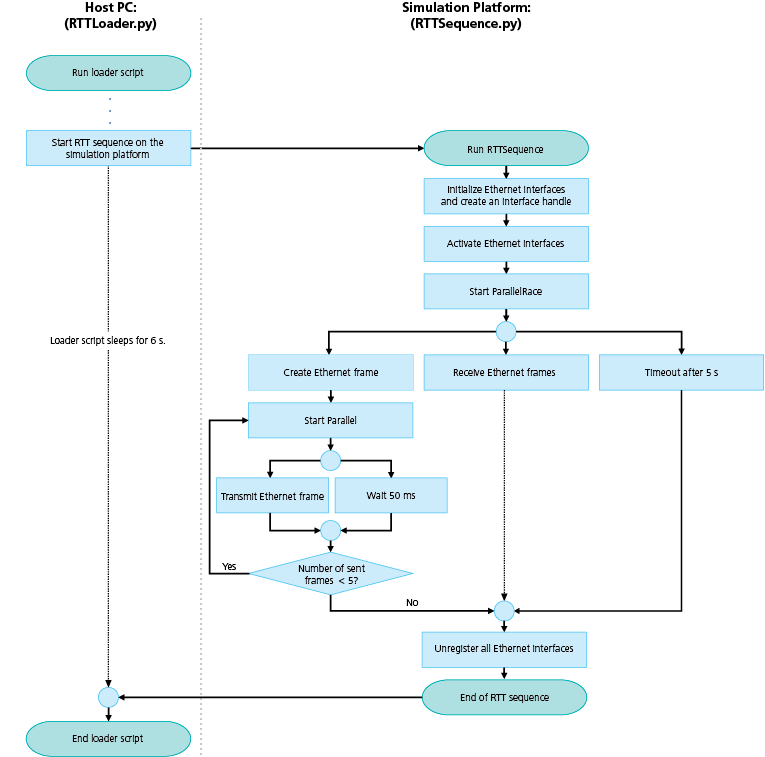
Your RTT sequence has the following functionality:
Initializing Ethernet interfaces.
Creating and transmitting Ethernet frames.
Receiving Ethernet frames and writing information to the standard output.
Unregistering all Ethernet interfaces.
View the following illustration for more details:
- Parts
This step is divided into the following parts:
To load and start the real-time application for Ethernet communication to your SCALEXIO system, refer to Part 1.
RTTSequence.py: To write an RTT sequence for this step, refer to Part 2.RTTLoader.py: To write a loader script for this step, refer to Part 3.To start the RTT sequence, refer to Part 4.
Part 1: To load and start the real-time application to your SCALEXIO system
In ControlDesk, click Status Control – Go Online on the Home ribbon.
ControlDesk connects itself to the registered platform and the real‑time application is loaded to the platform. The loaded application starts automatically.
Interim result
You have loaded and started the real-time application to your SCALEXIO system. In the next part, you will write an RTT sequence to transmit and receive your own Ethernet frames.
Part 2: To write an RTT sequence to transmit and receive Ethernet frames
In the File Explorer, navigate to your
Work folderand create the following subfolders:…\Lesson7Step2\SimulationPlatform\…\Lesson7Step2\HostPC\
Create a new Python script.
Copy the following code to the Python editor:
""" File: RTTSequence.py Destination: Simulation platform Description: Transmitting and receiving Ethernet frames using the rttlib.dsethernetapilib module. """ # Import classes from the rttlib module. from rttlib import utilities from rttlib import scheduler from rttlib import dsethernetapilib # Identifier for RTT print messages. rttPrefix = " *RTT:* " # Global lists to hold Ethernet interface information and handles. InterfaceInfoObjects = [] InterfaceHandles = []#----------------------------------------------------------------------------- # Generator functions #----------------------------------------------------------------------------- def initEthernetGen(): """ To initialize Ethernet interfaces with the rttlib.dsethernetapilib module. """ # Use the global lists to hold Ethernet interface information and handles. global InterfaceInfoObjects global InterfaceHandles print("=" * 80) print("Initializing Ethernet interfaces") print("=" * 80) # Retrieve the information about all available Ethernet interfaces. InterfaceInfoObjects = dsethernetapilib.GetAvailableInterfaces() yield None# Initialize all available Ethernet interfaces. for interface in InterfaceInfoObjects: # Register Ethernet interfaces and create an interface handle. InterfaceHandle = dsethernetapilib.RegisterInterface( interface.AccessProviderName, \ interface.InterfaceName, \ interface.InterfaceSerialNumber, \ interface.InterfaceIdentifier) # Add the interface handle to the global list. InterfaceHandles.append(InterfaceHandle) # The initialization of an Ethernet interface may last several model # steps. If the initialization is successful, the function returns # 'True'. As long as the return value of InitInterface() is 'None', # the interface is not initialized. Implement a timeout to avoid an # endless loop due to an interface initialization that may not be # possible. IsInitialized = None TimeOutSteps = 1000 while(IsInitialized == None): IsInitialized = dsethernetapilib.InitInterface(InterfaceHandle) TimeOutSteps -= 1 if(TimeOutSteps <= 0): raise Exception("Could not initialize Ethernet interfaces.") yield None # Write the name of the initialized Ethernet interface to the # standard output. print("%s Initialized Ethernet interface: %s" % (rttPrefix, interface.InterfaceIdentifier)) yield None # Activate valid Ethernet interfaces. Only registered and initialized # Ethernet interfaces can be activated. dsethernetapilib.ActivateInterface(InterfaceHandle) yield None yield Nonedef unregisterEthernetGen(): """ To unregister all Ethernet interfaces. """ # Use the global list with all previously registered Ethernet interfaces. global InterfaceHandles # Unregister all Ethernet interfaces. for InterfaceHandle in InterfaceHandles: dsethernetapilib.UnregisterInterface(InterfaceHandle) yield Nonedef TransmitGen(): """ To create and transmit an Ethernet frame 5 times with an interval of 50 ms. """ try: # Create an Ethernet frame object. Frame = dsethernetapilib.EthRawFrame() print(rttPrefix + "Ethernet frame object created") yield None # Set the FrameType to ftETHERNET (Ethernet frame with frame check # sequence). Frame.Header.FrameType = dsethernetapilib.ftETHERNET print(rttPrefix + "Ethernet frame type set to ftETHERNET (with " + "frame check sequence)") yield None # Set the data length to 1500 bytes. Frame.Header.RawDataLength = 1500 print(rttPrefix + "Raw data length set to 1500 bytes") yield None # Create a list with a length of 1500 bytes with numbers # from 0 to 255. RawDataList1500Bytes = [x%256 for x in range(0, 1500)] print(rttPrefix + "List with a length of 1500 bytes created") yield None # Set the list as raw data in the Ethernet frame. Frame.RawData = RawDataList1500Bytes print(rttPrefix + "Created list set as raw data in the Ethernet " + "frame\n") yield Noneprint("=" * 80) print("Transmitting and receiving Ethernet frames") print("=" * 80) # Transmit the Ethernet frame 5 times with an interval of 50 ms. transmittedFrames = 0 while(transmittedFrames < 5): # Create a buffer object to be used for transmitting # Ethernet frames. The 'Frame.Length' attribute considers the # raw data length and the header length. TransmitBuffer = dsethernetapilib.CreateBuffer(Frame.Length) # Trigger the frame transmission every 50 ms in a 'parallel' # environment. All functions must be generator functions. yield scheduler.Parallel(TransmitFrameGen(TransmitBuffer, Frame), utilities.Wait(0.05)) transmittedFrames += 1 yield None finally: # Clean up Frame = None TransmitBuffer = Nonedef TransmitFrameGen(TransmitBuffer, Frame): """ To transmit the Ethernet frame. """ print("%s Ethernet frame transmitted from %s at: t = %.3f s" % (rttPrefix, InterfaceInfoObjects[0].InterfaceIdentifier, utilities.currentTime.Value)) # Ethernet frames are transmitted from the first Ethernet interface. yield dsethernetapilib.TransmitFrames(InterfaceHandles[0], TransmitBuffer, [Frame])def ReceiveGen(): """ To receive Ethernet frames. """ # The Ethernet frames are transmitted and received at the same time. For # this reason, a receive buffer that is large enough to hold one # Ethernet frame is sufficient (size of buffer in bytes). ReceiveBufferSize = 2000 rxList = [] try: # Create receive buffer. ReceiveBuffer = dsethernetapilib.CreateBuffer(ReceiveBufferSize) # Endless loop to read all Ethernet frames in the receive queue. while 1: # Ethernet frames are read from the second Ethernet interface rxList = dsethernetapilib.ReadFrames(InterfaceHandles[1], ReceiveBuffer) # Check if list of received frames is not empty. if len(rxList) > 0: print ("%s Ethernet frame received from %s at: t = %.3f s\n" % (rttPrefix, InterfaceInfoObjects[1].InterfaceIdentifier, utilities.currentTime.Value)) yield None finally: # Nothing left to clean up. pass# ---------------------------------------------------------------------------- # MainGenerator function # ---------------------------------------------------------------------------- def MainGenerator(): """ Main generator function of the RTT sequence. """ print(rttPrefix + "Start of real-time test execution on target platform\n") # Initialize Ethernet interfaces. yield initEthernetGen() print("\n" + "=" * 80) print("Create Ethernet frames") print("=" * 80) # Transmit and receive in parallel. The wait function is added as timeout. yield scheduler.ParallelRace(TransmitGen(), ReceiveGen(), utilities.Wait(5.0)) # Unregister Ethernet interfaces. yield unregisterEthernetGen() print("=" * 80) print(rttPrefix + "End of real-time test execution") print("=" * 80)Save the file as:
…\Lesson7Step2\SimulationPlatform\RTTSequence.py.
Interim result
You have written an RTT sequence to transmit and receive Ethernet frames with the rttlib.dsethernetapilib module.
Continue with the next part to write a loader script.
Part 3: To write a loader script for Ethernet communication
Create a new Python script.
Copy the following code to the Python editor:
""" File: RTTLoader.py Destination: Host PC Description: To load and start the RTT sequence. """ # This Python library is used to handle the test script download. import rttmanagerlib # Use the standard Python built-in libraries for operation-system commands. import pathlib import time # Get the path of your RTT sequence. workingDir = pathlib.Path(__file__).parent.parent.resolve() testScriptName = str(workingDir / "SimulationPlatform" / "RTTSequence.py") # Import RTT demo utilities. import rttdemoutilitiesdef executeDemo(boardName, sequenceName): """ Executes the Real-Time Testing demo. """ # Create new RTTManagerServer instance rttManager = rttmanagerlib.RealTimeTestManagerServer() # Generate byte code from the test script (RTT sequence) bcgFileName = rttManager.BCGServiceProvider.Generate(sequenceName,[]) # Establish the real-time platform connection. board = rttManager.AccessBoard(boardName) # Connect to the sequences events handle sequencesEvents = rttdemoutilities.RTTMSequencesEvents(board.Sequences) # Load a sequence to the real-time platform sequence = board.Sequences.Create(bcgFileName) # Start the sequence on the real-time platform sequence.Run() # Suspend host script for the execution time of the real-time testing # script numberOfSeconds = 6 time.sleep(numberOfSeconds)# ---------------------------------------------------------------------------- # Main Program # ---------------------------------------------------------------------------- """ To transmit and receive Ethernet frames with the rttlib.dsethernetapilib module, invoke boardName with IP address/turnlamp. """ boardName = "<IP address>/turnlamp" print("\nThe RTT demonstration for Ethernet communication on a " + "SCALEXIO system is starting...") try: executeDemo(boardName, testScriptName) except: print("The 'executeDemo(boardName, testScriptName)' function cannot be " + "started.") print("Check the 'boardName' and 'testScriptName' arguments.") print("\nThe real-time testing demonstration was successfully completed.")Save the file as:
…\Lesson7Step2\HostPC\RTTLoader.py.
Interim result
You have written a loader script for this step. Make sure that you invoke boardName with the IP address of your SCALEXIO system. Continue with the next part to start the RTT sequence.
Part 4: To start the RTT sequence
Start your loader script located in:
…\HostPC\RTTLoader.py.You can compare your results with the illustration below.
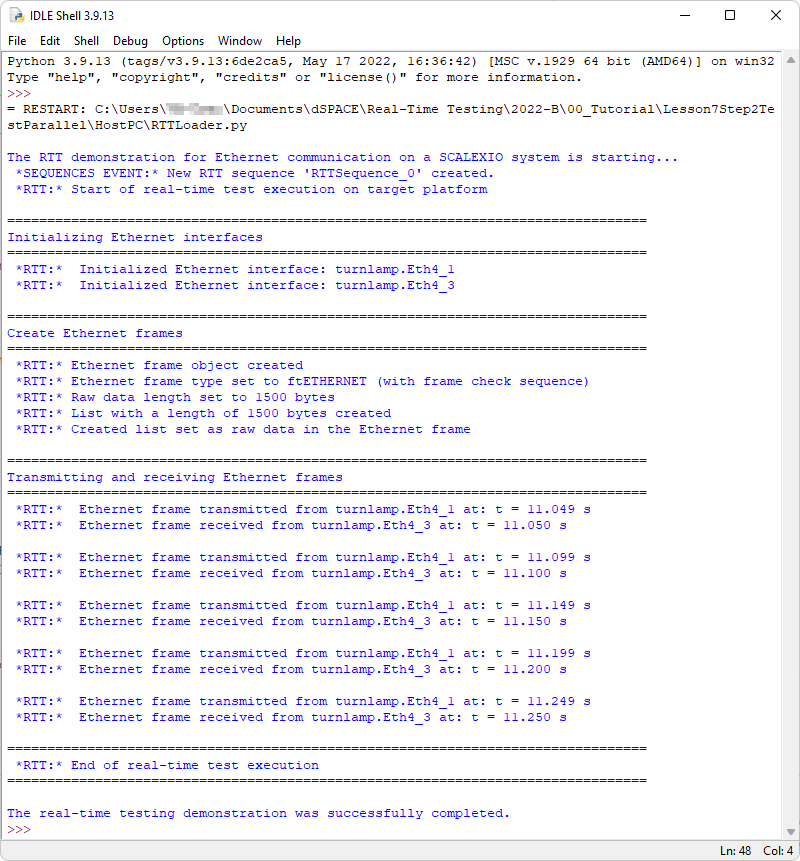
Result
In this step, you have learned how to transmit and receive Ethernet frames via Real‑Time Testing on a SCALEXIO system using the rttlib.dsethernetapilib module. For a summary of your working results and for further information, refer to the result of this lesson.