Step 4: How to Manage RTT Sequences with Loader Scripts
Objective
In this step, you will learn how to write loader scripts to manage your RTT sequences.
Basics
- Starting RTT sequences with parameters
You can use loader scripts to specify run parameters for RTT sequences. Instead of using the graphical user interface of the Real-Time Test Manager, you can set the parameters with the
Createmethod.You can use the following syntax for creating RTT sequences with parameters:
# This Python library is used to handle the test script download.
import rttmanagerlib

# Create new RTTManagerServer instance.
rttManager = rttmanagerlib.RealTimeTestManagerServer()

# Convert the RTT sequence into a signed byte code generator (BCG) file
bcgFileName = rttManager.BCGServiceProvider.Generate(<path of RTT sequence>,[])

# Establishing the real-time platform connection.
board = rttManager.AccessBoard("<platform name> or <IP address/name>")

# Selecting whether the RTT sequence is executed before
# or after the simulation step.
scComp = rttmanagerlib.constants.<scPreComputation or scPostComputation>

# Load an RTT sequence with start parameters to the real-time platform.
sequence = board.Sequences.Create(
        bcgFileName,
        SequenceChannel = scComp,
        Priority = <1...256>,
        Description = "Description of the RTT sequence")
- Managing an RTT sequence
You can manage single RTT sequences with a loader script.
Available commands are:
sequence.Run()sequence.Pause()sequence.Continue()sequence.Stop()sequence.Remove()
- Managing several RTT sequences at once
With a loader script, it is also possible to manage several RTT sequences at once (in the same simulation step). In your loader script, you can use commands like:
board.sequences.RunAll().
- Functionality of the RTT sequences
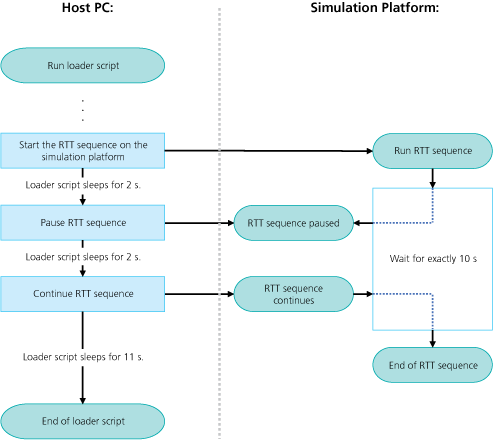
The functionality of the RTT sequences is the same as in the first step. Your RTT sequences will write two messages with a time interval of 10 s.
View the following illustration for more details:
Part 1: To write an RTT sequence for this step
In the File Explorer, navigate to your
Work folderand create the following subfolders:…\Lesson1Step4\SimulationPlatform\…\Lesson1Step4\HostPC\
Copy the RTT sequence from the previous step:
…\Lesson1Step3\SimulationPlatform\RTTsequence.py.Paste the RTT sequence into the folder:
…\Lesson1Step4\SimulationPlatform\.
Interim result
You have copied the RTT sequence from the previous step. Continue with the next part to write a loader script.
Part 2: To manage an RTT sequence with a loader script
Create a new Python script.
Copy the following code to the Python editor:
""" File: RTTLoader.py Destination: Host PC Description: To load, start, and manage a single RTT sequence. """ # This Python library is used to handle the test script download. import rttmanagerlib # Use the standard Python built-in libraries for operation-system commands. import pathlib import time # Get the path of your RTT sequence. workingDir = pathlib.Path(__file__).parent.parent.resolve() testScriptName = str(workingDir / "SimulationPlatform" / "RTTSequence.py") # Import real-time testing demo utilities. import rttdemoutilitiesdef executeDemo(boardName): """ Executes the Real-Time Testing demo. """ # Create new RTTManagerServer instance rttManager = rttmanagerlib.RealTimeTestManagerServer() # Convert the RTT sequence into a signed byte code generator (BCG) file bcgFileName = rttManager.BCGServiceProvider.Generate(testScriptName,[]) # Establish the real-time platform connection board = rttManager.AccessBoard(boardName) # Connect to the sequences events handle sequencesEvents = rttdemoutilities.RTTMSequencesEvents(board.Sequences) # Load a sequence to the real-time platform sequence = board.Sequences.Create(bcgFileName)# ------------------------------------------------------------------------ # Manage the RTT sequence # ------------------------------------------------------------------------ # Start the RTT sequence. sequence.Run() # Suspend host script. time.sleep(2) # Pause the RTT sequence. sequence.Pause() print("The sequence is paused for 2s.") time.sleep(2) # Continue the RTT sequence. sequence.Continue() print("Execution of the RTT sequence is continued.") # Suspend host script for the execution time of the RTT script numberOfSeconds = 11 time.sleep(numberOfSeconds)# ---------------------------------------------------------------------------- # Main program # ---------------------------------------------------------------------------- """ The executeDemo(boardName) function must be called with an argument. Otherwise your loader script cannot access your simulation platform. Edit the boardName variable. You can use the same value for boardName as used in Lesson 1, Step3. """ boardName = "127.0.0.1/turnlamp" executeDemo(boardName)Save the file as:
…\HostPC\RTTLoader.py.Start the script in your Python editor.
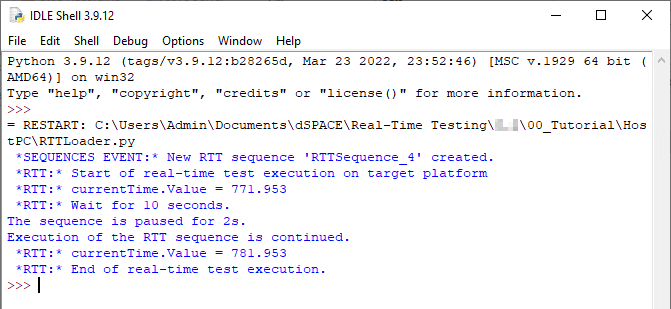
You have paused the execution of your RTT sequence for 2 s but the time interval of the two print messages remains 10 s as before. Pausing the RTT sequence has only an influence on the time interval of the two print messages if the execution of the RTT sequence is paused for more than 10 s.
# The built-in wait function compares the "start time" and the "time to wait"
# with the "current time".

yield utilities.Wait(10.0)
Interim result
You have written a loader script to manage a single RTT sequence. Continue with the next part to manage several RTT sequences at once.
Part 3: To manage several RTT sequences at once with loader scripts
Create a new Python script in:
…\Lesson1Step4\HostPC\Copy the following code to the Python editor:
""" File: RTTLoaderMult.py Destination: Host PC Description: To load, start, and manage several RTT sequences. """ # This Python library is used to handle the test script download. import rttmanagerlib # Use the standard Python built-in libraries for operation-system commands. import pathlib import time # Get the path of your RTT sequence. workingDir = pathlib.Path(__file__).parent.parent.resolve() testScriptName = str(workingDir / "SimulationPlatform" / "RTTSequence.py") # Import real-time testing demo utilities. import rttdemoutilitiesdef executeDemo(boardName): """ Executes the Real-Time Testing demo. """ # Create new RTTManagerServer instance rttManager = rttmanagerlib.RealTimeTestManagerServer() # Convert the RTT sequence into a signed byte code generator (BCG) file bcgFileName = rttManager.BCGServiceProvider.Generate(testScriptName,[]) # Establish the real-time platform connection board = rttManager.AccessBoard(boardName) # Connect to the sequences events handle sequencesEvents = rttdemoutilities.RTTMSequencesEvents(board.Sequences)#------------------------------------------------------------------------- # Load three sequences with parameters to the simulation platform #------------------------------------------------------------------------- scPreComp = rttmanagerlib.constants.scPreComputation sequence1 = board.Sequences.Create(bcgFileName, SequenceChannel = scPreComp, Priority = 2, Description = "My first RTT sequence") # Load a 2nd sequence to the real-time platform sequence2 = board.Sequences.Create(bcgFileName, SequenceChannel = scPreComp, Priority = 1, Description = "My second RTT sequence") # Load a 3rd sequence to the real-time platform sequence3 = board.Sequences.Create(bcgFileName, SequenceChannel = scPreComp, Priority = 2, Description = "My third RTT sequence")# ------------------------------------------------------------------------ # To control all RTT sequences at once # ------------------------------------------------------------------------ # Start the RTT sequences. board.Sequences.RunAll() # Suspend host script. time.sleep(2) # Pause the RTT sequences. board.Sequences.PauseAll() print("The sequences are paused for 2s.") time.sleep(2) # Continue the RTT sequences. board.Sequences.ContinueAll() print("Execution of the RTT sequences is continued.") # Suspend host script for the execution time of the RTT script numberOfSeconds = 11 time.sleep(numberOfSeconds)# ---------------------------------------------------------------------------- # Main program # ---------------------------------------------------------------------------- """ The executeDemo() function must be started with an argument which depends on your simulation platform. Use the same input as in Lesson 1, Step3. """ boardName = "127.0.0.1/turnlamp" executeDemo(boardName)Save the file as:
…\HostPC\RTTLoaderMult.py.Start the script in your Python editor.
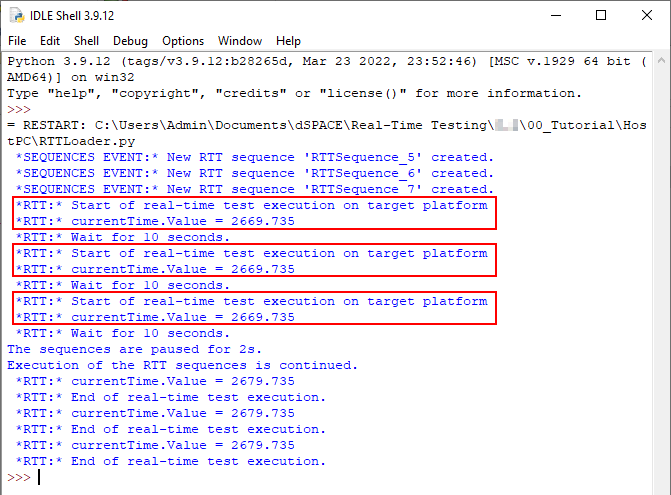
You have managed several RTT sequences at once.
In this example, setting the Priority parameter has no visible influence on the execution of the RTT sequences. All three RTT sequences are executed in the same sampling step. The priority becomes important when you use different interdependent RTT sequences.
Result
In this step you have learned:
To manage a single RTT sequence with a loader script.
To manage several RTT sequences at once with a loader script (in the same simulation step).
To set start parameters for RTT sequences with a loader script.
What’s next
In the next step, you will start several generator functions in parallel.