Step 6: How to Use Global Variables in RTT Sequences
Objective
In this step, you will learn how to use global variables in different RTT sequences.
You will initialize a global variable in a first RTT sequence.
You will access the same global variable in a second RTT sequence.
Basics
- Global variables
The
rttlib.globalvariablesmodule can be used to share global data between different RTT sequences. It persists as long as the Python interpreter is running.Keep in mind that there are two different types of global variables.
rttlib.globalvariables: A dSPACE-provided module, which enables global variables between different RTT sequences. You can use the following syntax to create a global variable.from rttlib import globalvariables # Create "myvariable1" globalvariables.myvariable1 = 42.0Global variables (Python): If you write a function in a Python script, a local namespace will be created. In this namespace, you can use all variables that are assigned to this function and additionally all variables from the parameter list. Global variables are created outside of functions, usually in the header of a script. You can use them inside and outside functions in your script but not in other RTT sequences.
- Functionality of the RTT sequence
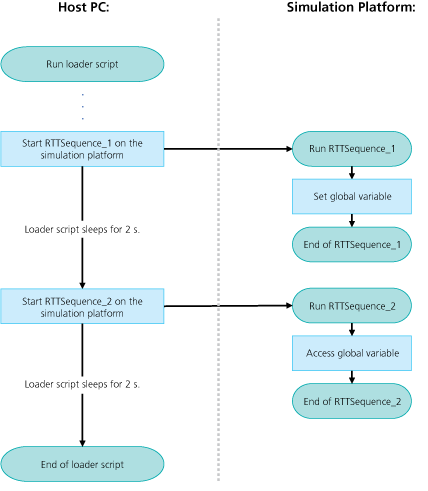
Initialization of a global variable.
Accessing and writing the global variable from a second RTT sequence.
View the following illustration for more details:
Part 1: To write a loader script that starts multiple RTT sequences subsequently
In the File Explorer, navigate to your
Work folderand create the following subfolders:…\Lesson1Step6\SimulationPlatform\…\Lesson1Step6\HostPC\
Create a new Python script.
Copy the following code to the Python editor:
""" File: RTTLoader.py Destination: Host PC Description: To load and start two RTT sequences subsequently. """ # This Python library is used to handle the test script download. import rttmanagerlib # Use the standard Python built-in libraries for operation-system commands. import pathlib import time # Get the path of your RTT sequence. workingDir = pathlib.Path(__file__).parent.parent.resolve() testScriptName = str(workingDir / "SimulationPlatform" / "RTTSequence.py") # Create a list with all RTT sequences. testScriptList = [] testScriptList.append(str(workingDir / "SimulationPlatform" / "RTTSequence_1.py")) testScriptList.append(str(workingDir / "SimulationPlatform" / "RTTSequence_2.py")) # Import real-time testing demo utilities. import rttdemoutilitiesdef executeDemo(boardName): """ Executes the Real-Time Testing demo. """ # Create new RTTManagerServer instance. rttManager = rttmanagerlib.RealTimeTestManagerServer() # Convert all RTT sequences in testScriptList into signed # byte code generator (BCG) files. bcgFileList = [] for testScriptName in testScriptList: bcgFileList.append(rttManager.BCGServiceProvider.Generate( testScriptName,[])) # Establish the real-time platform connection. board = rttManager.AccessBoard(boardName) # Connect to the sequences events handle. sequencesEvents = rttdemoutilities.RTTMSequencesEvents(board.Sequences) # Load/run subsequently all RTT sequences which are in the bcgFileList for bcgFileName in bcgFileList: sequence = board.Sequences.Create(bcgFileName) # Start the sequence on the real-time platform. sequence.Run() # Suspend host script before the next RTT sequence will be executed. numberOfSeconds = 2 time.sleep(numberOfSeconds)# ---------------------------------------------------------------------------- # Main program # ---------------------------------------------------------------------------- """ The executeDemo() function must be started with an argument which depends on your simulation platform. Use the same input as in Lesson 1, Step3. """ boardName = "127.0.0.1/turnlamp" executeDemo(boardName)Save the file as:
…\HostPC\RTTLoader.py.
Interim result
You have created a loader script that creates two RTT sequences and runs the RTT sequences subsequently. Continue with the next part to write two RTT sequences.
Part 2: To write RTT sequences to use global variables
Create a new Python script.
Copy the following code to the Python editor:
""" File: RTTSequence_1.py Destination: Simulation platform Description: Initializing a global variable. """ # Provides functions for common real-time operations. from rttlib import utilities # Import rttlib.globalvariables to enable global variables. from rttlib import globalvariables # Initializing of a global variable globalvariables.myGlobalVariable = 42 # Get sequence properties. In this example, only the sequence name is used. SequenceProperties = utilities.SequenceProperties() SequenceName = SequenceProperties.Name # Identifier for RTT print messages. rttPrefix = r" *RTT:* "# ---------------------------------------------------------------------------- # MainGenerator function #----------------------------------------------------------------------------- def MainGenerator(): """ Main generator function of the RTT sequence. """ print(rttPrefix + "Set myGlobalVariable in %s to: %d" % (SequenceName, globalvariables.myGlobalVariable)) print(rttPrefix + "myGlobalVariable = %d" % globalvariables.myGlobalVariable) print(rttPrefix + "End of %s " % SequenceName) yield NoneSave the file as:
…\SimulationPlatform\RTTSequence_1.py.You have created an RTT sequence, which sets a global variable.
Create a new Python script.
Copy the following code to the Python editor:
""" File: RTTSequence_2.py Destination: Simulation platform Description: Accessing a global variable. """ # Provides functions for common real-time operations. from rttlib import utilities # Import rttlib.globalvariables to enable global variables. from rttlib import globalvariables # Get sequence properties SequenceProperties = utilities.SequenceProperties() SequenceName = SequenceProperties.Name # Identifier for RTT print messages. rttPrefix = r" *RTT:* "# ---------------------------------------------------------------------------- # MainGenerator function #----------------------------------------------------------------------------- def MainGenerator(): """ Main generator function of the RTT sequence. """ print(rttPrefix + "Start of %s on target platform" % SequenceName) print(rttPrefix + "myGlobalVariable is accessible here, too.") print(rttPrefix + "myGlobalVariable = %d" % globalvariables.myGlobalVariable) print(rttPrefix + "End of %s " % SequenceName) yield NoneSave the file as:
…\SimulationPlatform\RTTSequence_2.py.You have created a second RTT sequence, which accesses the global variable defined in the previous RTT sequence.
Interim result
You have created two RTT sequences. The first RTT sequence initializes a global variable. The second RTT sequence accesses the same global variable. Continue with the next part to start both RTT sequences subsequently.
Part 3: To start the RTT sequences
Start your loader script located in:
…\HostPC\RTTLoader.py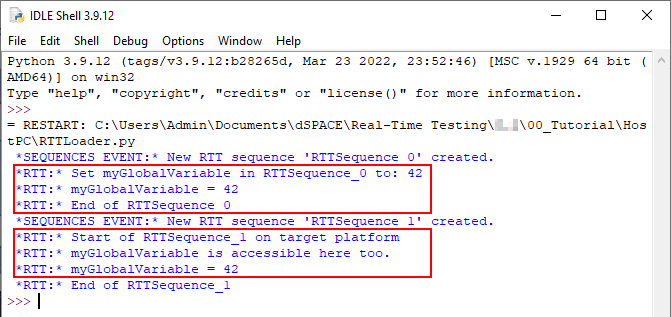
You have used global variables within your RTT sequences.
Result
You have learned how to use global variables to share data between different RTT sequences. Your global variables persist as long as the Python interpreter is running.
What’s next
With this step, you finished the introduction to Real-Time Testing. For a summary of your working results and for further information, refer to the result of this lesson.