Step 4: How to Use Dynamic Variables to Exchange Data
Objective
In this step, you will learn how to use dynamic variables to make data available on the simulation platform and on the host PC.
Basics
- Dynamic variables
View the following list for a detailed description of dynamic variables:
Dynamic variables are accessible from RTT sequences and from the host PC. You can use dynamic variables to create a user-defined interface between the host PC and RTT sequences.
Dynamic variables persist on the simulation platform even if the RTT sequence where the variable was created is removed.
The
DynamicVariableclass has two independent attributes:The
Valueattribute supports only the float data type.The
DynamicValueattribute supports several data types (Boolean, integer, float, string, tuple, Python objects) or a combination of them. If a list data type is used, it is converted to a tuple for the host-platform communication. The dictionary data type is not supported. Before the DynamicValue is read for the first time, it must be set initially. Otherwise an exception is triggered.
Dynamic variables can only be created and accessed on the local CPU in a multiprocessor system. It is not possible to use dynamic variables in RTT sequences running on different CPUs in a multiprocessor system.
Event handling on adding new dynamic variables can be implemented on the host PC.
Dynamic variables can be removed by reloading the simulation application.
Note
You cannot read and write data from the host PC to the simulation platform in real time.
- Functionality of the RTT sequence
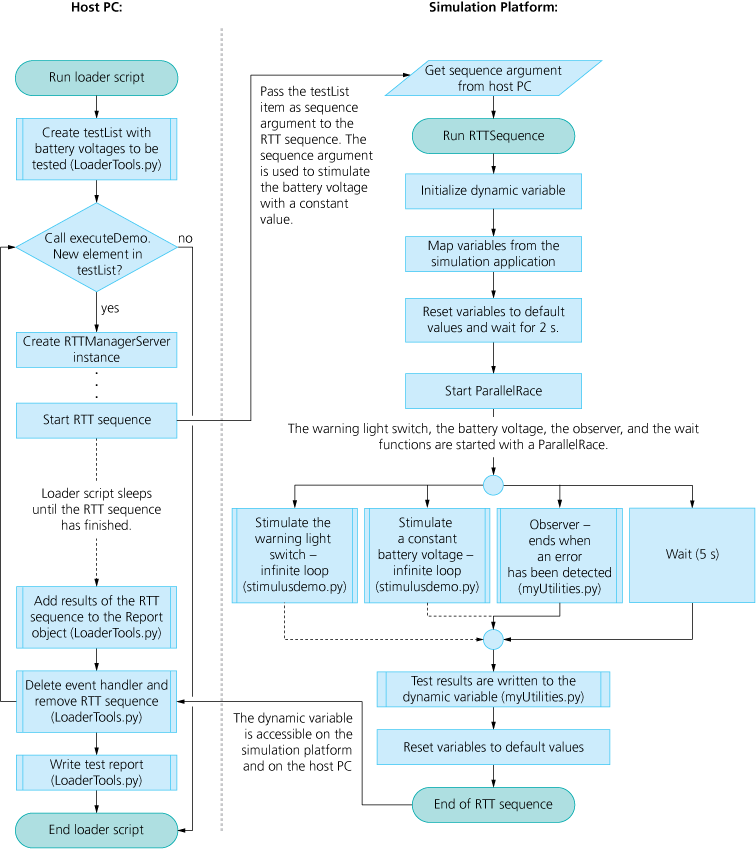
The RTT sequence will be started three times in a row.
A sequence argument will be passed to the RTT sequence. The battery voltage of the simulation application will be set to the value of the sequence argument.
The warning light switch will be stimulated.
Each run of the RTT sequence ends when the warning light has flashed synchronously for 5 s or when non-synchronous flashing is detected.
Data will be exchanged with the host PC via dynamic variables.
View the following illustration for more details:
- Parts
This step is divided into the following parts:
myUtilities.py: To write the Python module, refer to Part 1.stimulusdemo.py: To write the Python module, refer to Part 2.RTTSequence.py: To write an RTT sequence for this step, refer to Part 3.EventHandler.py: To write the Python module, refer to Part 4.LoaderTools.py: To write a Python module with different utilities for the loader script, refer to Part 5.RTTLoader.py: To write a loader script for this step, refer to Part 6.To start the RTT sequence, refer to Part 7.
Part 1: To write the utilities module
In the File Explorer, navigate to your
Work folderand create the following subfolders:…\Lesson3Step4\SimulationPlatform\…\Lesson3Step4\HostPC\
Create a new Python script.
Copy the following code to the Python editor:
""" File: myUtilities.py Destination: Simulation platform Description: Results of the RTT sequences are exchanged between the simulation platform and the host PC via dynamic variables. """ # Module imports import math from rttlib import utilities # Module global variables currentTime = utilities.currentTime # Import the dynamic variable module from rttlib import dynamicvariable # Use deques instead of lists to make the data real-time capable. from collections import deque # Identifier for RTT print messages. rttPrefix = r" *RTT:* " # Possible test states: testSuccess = 1 testUndefined = 0 testFailure = -1# ---------------------------------------------------------------------------- # Generator functions # ---------------------------------------------------------------------------- def frontRearObservatorGen(signalFront, signalRear, UBattery): """ Checks if the front and rear signals are flashing synchronously. Parameters: signalFront: A model variable for the front signal. signalRear : A model variable for the rear signal. UBattery : A model variable for the battery voltage. Description: Checks if the warning light is flashing synchronously. The results are written to a dynamic variable, which is available on the simulation platform as well as on the host PC. Dynamic variable: .Value : Test states (testSuccess/testUndefined/testFailure) .DynamicValue: deque([UBattery, failureTimer]) """ # Create a variable object to access the dynamic variable RTT_TestResult. # The results during the RTT sequence are written to the .Value and # to the .DynamicValue parts of the dynamic variable. Make sure that the # .DynamicValue is set. It cannot be read before initialization.sequenceResults = dynamicvariable.DynamicVariable("RTT_TestResult") sequenceResults.Value = testUndefined sequenceResults.DynamicValue = deque([UBattery, "n/a"]) # Get start time. startTestTime = currentTime.Value# Infinite while loop. Each iteration consists of a complete # watch-detect-validate cycle. while(1): # Check if states of the front and the rear signal are different. signalDifference = signalFront.Value - signalRear.Value if signalDifference: # Wait for the next generator loop. yield None # If the front and rear signals differ, wait for 50 ms. yield utilities.Wait(0.05)# Start a validation loop and check for the next 100 ms # whether all signals have the same value or not. startValidation = currentTime.Value while currentTime.Value < startValidation + 0.1: # Wait for the next generator loop. yield None # Check if states of the front and rear signals are different signalDifference = signalFront.Value - signalRear.Value# If the signal values are different, the test has failed. if signalDifference: # Write the test result to dynamicvariable.Value. sequenceResults.Value = testFailure # Get a failure timer with 3 digits. Use the math module, # which is supported by Real-Time Testing instead of the # built-in round function. failureTimer = (math.modf( (currentTime.Value - startTestTime)*1000))[1]/1000 # Write a deque with results to # dynamicvariable.DynamicValue. sequenceResults.DynamicValue = \ deque([UBattery, failureTimer]) # Abort the test if a failure has been detected. return yield None yield NoneSave the file as:
…\Lesson3Step4\SimulationPlatform\myUtilities.py.
Interim result
You have adapted the utilities module. Results of an RTT sequence are now exchanged with the host PC via dynamic variables.
Continue with the next part to write the Python module stimulusdemo.py
Part 2: To write the stimulusdemo module
Copy the Python module from the previous step:
…\Lesson3Step3\SimulationPlatform\stimulusdemo.py.Paste the Python module into the folder:
…\Lesson3Step4\SimulationPlatform\.
Interim result
You have created the Python module stimulusdemo.py, with the same functionality as in the previous step. Continue with the next part to write an RTT sequence.
Part 3: To write an RTT sequence with implemented exception handling
Create a new Python script.
Copy the following code to the Python editor:
""" File: RTTSequence.py Destination: Simulation platform Description: Stimulation of the warning light switch and the battery voltage with a constant value. Results are exchanged between the RTT sequences and the host PC via dynamic variables. """ # Provides functions for common real-time operations. from rttlib import utilities # Import the variable module from the rttlib package. from rttlib import variable # Import scheduler to use ParallelRace(). from rttlib import scheduler # Import the dynamic variable module from rttlib import dynamicvariable # Initialize a dynamic variable. sequenceResults = dynamicvariable.DynamicVariable("RTT_TestResult") sequenceResults.Value = 0# Use deques instead of lists to make the data real-time capable. from collections import deque # Import your Python modules. import stimulusdemo import myUtilities # Create variable objects for accessing simulation application. WarningLightSwitch = variable.Variable( r'Model Root/WarningLightSwitch[0|1]/Value') BatteryVoltage = variable.Variable(r'Model Root/BatteryVoltage[V]/Value') # To shorten the script only the lights on the left side are investigated. FL = variable.Variable(r'Model Root/FrontLightEcu/TurnSignalLeft') RL = variable.Variable(r'Model Root/RearLightEcu/TurnSignalLeft') # Identifier for RTT print messages. rttPrefix = r" *RTT:* " # Possible test states: testSuccess = 1 testUndefined = 0 testFailure = -1#----------------------------------------------------------------------------- # Generator functions #----------------------------------------------------------------------------- def resetGen(): """ Set the variables from the simulation application back to default values. """ WarningLightSwitch.Value = 0 BatteryVoltage.Value = 12.0 yield Nonedef stimulateWarningLightSwitchGen(): """ Stimulates the warning light switch. """ yield stimulusdemo.constGen(WarningLightSwitch, 1)def stimulateBatteryVoltageGen(argument): """ Stimulates the battery voltage with the value passed as sequence argument. """ yield stimulusdemo.constGen(BatteryVoltage, argument)def ObserverGen(argument): """ Observer function to check if the warning light is flashing synchronously. """ yield myUtilities.frontRearObservatorGen(FL, RL, argument)# ---------------------------------------------------------------------------- # MainGenerator function # ---------------------------------------------------------------------------- def MainGenerator(*args): """ Main generator function of the RTT sequence. Description: To pass a sequence argument, the main generator must be called with *args. """ numberOfSeconds = 5 # Set default values before the test starts. yield resetGen() # Suspend the RTT sequence to avoid malfunctions if the battery voltage # was very low before the reset. yield utilities.Wait(2)# Start all generator functions with ParallelRace(). The ParallelRace will # end if numberOfSeconds is reached or the observer has detected a # failure. yield scheduler.ParallelRace(stimulateWarningLightSwitchGen(), stimulateBatteryVoltageGen(args[0]), ObserverGen(args[0]), utilities.Wait(numberOfSeconds)) # If the test status is still testUndefined, the Observer has not found # any errors and the test has passed. if sequenceResults.Value == testUndefined: sequenceResults.Value = testSuccess yield None # Set default values after the test. yield resetGen()Save the file as:
…\Lesson3Step4\SimulationPlatform\RTTSequence.py.
Interim Result
You have written an RTT sequence. Results are exchanged between the RTT sequences and the host PC via dynamic variables. Continue with the next part to write the Python module EventHandler.py.
Part 4: To write a Python module for event handling
Create a new Python script.
Copy the following code to the Python editor:
""" File: EventHandler.py Destination: Host PC Description: To implement event handling. """ import rttmanagerlib # Dictionary to translate the state of RTT sequences to a readable string. State2Str = {rttmanagerlib.constants.sesNew : "New", rttmanagerlib.constants.sesTerminated : "Terminated", rttmanagerlib.constants.sesError : "Error", rttmanagerlib.constants.sesStopped : "Stopped", rttmanagerlib.constants.sesRunning : "Running", rttmanagerlib.constants.sesPaused : "Paused", }#----------------------------------------------------------------------------- # Classes #----------------------------------------------------------------------------- class RTTMSequencesEvents(rttmanagerlib._IRTSequencesEvents): """ Event class to attach to RTT sequences events. Description: Class to implement a sequence event handling. """ def __init__(self, EventSource): """ Base class constructor to connect to event source """ rttmanagerlib._IRTSequencesEvents.__init__(self, EventSource)def OnError(self, Sequence): """ Method OnError """ print("OnError:\nTraceback (most recent call last):\n%s%s: %s" % (Sequence.LastExecutionError.Stack, Sequence.LastExecutionError.Type, Sequence.LastExecutionError.Value))def OnStateChanged(self, Sequence, NewState): """ Method OnStateChanged """ print("OnStateChanged: State of %s was changed to %s." % (Sequence.Name, State2Str[NewState]))def OnWrite(self, Sequence, Output): """ Method OnWrite """ print("OnWrite:" + Output)def OnRemove(self, Name): """ Method OnRemove """ print("OnRemove: %s was removed." % (Name))def OnCreate(self, Sequence): """ Method OnCreate """ print("On Create: New RTT sequence %s created." % (Sequence.Name))class RTTMVariablesEvents(rttmanagerlib._IRTVariablesEvents): """ Event class to attach to RTT variables events. Description: Class to implement a variables event handling. """ def __init__(self, EventSource = None, Parent = None): """ Base class constructor """ rttmanagerlib._IRTVariablesEvents.__init__(self, EventSource) self.Parent = Parent def OnAdd(self, Variable): """ Method OnAdd a new dynamic variable """ print("OnAdd: New dynamic variable %s added by RTT sequence %s." % (Variable.Name, Variable.SequenceName))Save the file as:
…\Lesson3Step4\HostPC\EventHandler.py.
Interim result
You have extended the Python module EventHandler.py to implement event handling for adding new dynamic variables. Continue with the next part to write the Python module LoaderTools.py.
Part 5: To write a Python module with tools for the loader script
Create a new Python script.
Copy the following code to the Python editor:
""" File: LoaderTools.py Destination: Host PC Description: To write a test report and other tools used in the loader script. """ # This Python library is used to handle the test script download. import rttmanagerlib # Use the standard Python built-in libraries for operation-system commands. import time # Use deques instead of lists to make the data real-time capable. from collections import deque # Possible test states: testSuccess = 1 testUndefined = 0 testFailure = -1#----------------------------------------------------------------------------- # Classes #----------------------------------------------------------------------------- class TestReport(object): """ Class to write a test report. Stores test results of all RTT sequences in a dictionary and writes a report to the standard output. """ def __init__(self): """ Creates a new TestReport object. Description: Initializes a TestReport object, which stores the results of all RTT sequences. """ # Create a dictionary to store the results of all RTT sequences. self.AllSequencesReport = {} # Summary of the test results. Remains on PASS only if all # RTT Sequences are executed without failures. Otherwise it is set # to FAIL. self.Summary = "PASS"def addResult(self, sequence, board): """ Stores results of the RTT sequences. Parameters : sequence: Variable object of the current RTT sequence. board : Variable object to establish a connection to the simulation platform. Description: Reads the dynamic variable (created in myUtilities.py) and writes the results of the current RTT sequence to a dictionary. The results of all RTT sequences are stored in a nested dictionary with the form: {sequence_1: {"Battery Voltage": DynamicValue[0], "Timer": DynamicValue[1], "RESULT": "PASS/FAIL"}, ..., sequence_n: {"Battery Voltage": DynamicValue[0], "Timer": DynamicValue[1], "RESULT": "PASS/FAIL"}} Dynamic variable: .Value : Test states (testSuccess/testUndefined/testFailure) .DynamicValue: deque([UBattery, failureTimer]) """# Initialize a dictionary to save the results of the current # RTT sequence. self.CurrentSequenceReport = {} # Access the dynamic variable on the host PC. for dynVar in board.Variables: if dynVar.Name=="RTT_TestResult": dynResults = dynVar # Add the battery voltage of the RTT sequence to the dictionary. self.CurrentSequenceReport["Battery Voltage [V]"] = \ dynResults.DynamicValue[0] # Add the time at which the failure occurs to the dictionary. self.CurrentSequenceReport["Timer - sequence failed after [s]"] = \ dynResults.DynamicValue[1] # Add the result to the dictionary. if dynResults.Value == testFailure and \ self.CurrentSequenceReport["Battery Voltage [V]"] < 8.0: self.CurrentSequenceReport["RESULT"] = "FAIL: Low voltage" self.Summary = "FAIL" elif dynResults.Value == testSuccess: self.CurrentSequenceReport["RESULT"] = "PASS" else: self.CurrentSequenceReport["RESULT"] = "Undefined" # Create a nested dictionary. Add the dictionary with the results of # the current RTT sequence to the dictionary with the overall results. self.AllSequencesReport[sequence.Name] = self.CurrentSequenceReportdef WriteReport(self): """ Writes a short summary of all results to the standard output on the host PC. """ print("=" * 80) print(" -- TEST REPORT --".center(79)) print("=" * 80) # Loop over the nested dictionary to view all results. Creates an own # paragraph for each RTT sequence. for runSequences, seqData in self.AllSequencesReport.items(): print("\n", runSequences) for key in seqData: print(" " + key + ":", seqData[key]) print("=" * 80) # Summary of the complete test. print("Summary: " + self.Summary)#----------------------------------------------------------------------------- # Functions #----------------------------------------------------------------------------- def createDemoData(): """ Creates a double-ended queue to pass different battery voltages as sequence arguments. """ #Initialize testList testList = deque([12.0, 7.3, 10.0]) return testListdef waitForSequenceFinished(sequence): """ Suspends the host script as long as the RTT sequence is in the running state. """ # Wait for 0.5 s so that the RTT sequence can switch to the running # state. time.sleep(0.5) # Sleep while the RTT sequence is in the running state. while rttmanagerlib.constants.sesRunning == sequence.State: time.sleep(1) # After the sequence state changes, wait again for 0.5 s # so that the event handler can process the last sequence events. time.sleep(0.5)def cleanUp(sequence, sequencesEvents, variablesEvents): """ Function to clean up at the end of an RTT sequence. """ # Delete sequences event handler. if sequencesEvents: sequencesEvents.close() sequencesEvents = None if variablesEvents: # Disconnect from variables event handle. variablesEvents.close() variablesEvents = None # Wait 0.5 s so that the event handler has enough time to process # the onRemove event. time.sleep(0.5) # Remove current RTT sequence from the simulation platform if sequence: sequence.Remove()Save the file as:
…\Lesson3Step4\HostPC\LoaderTools.py.
Interim result
You have written a Python module with tools for the loader script. You can use the tools, for example, to write a test report to the standard output. Continue with the next part to write a loader script.
Part 6: To write a loader script
Create a new Python script.
Copy the following code to the Python editor:
""" File: RTTLoader.py Destination: Host PC Description: To load and start several RTT sequences subsequently. Each RTT sequence is started with a sequence argument. """ # This Python library is used to handle the test script download. import rttmanagerlib # Use the standard Python built-in libraries for operation-system commands. import pathlib import time# Get the path of your RTT sequence. workingDir = pathlib.Path(__file__).parent.parent.resolve() testScriptName = str(workingDir / "SimulationPlatform" / "RTTSequence.py") # Import your Python modules. import EventHandler import LoaderToolsdef executeDemo(boardName, argument, Report): """ Executes the Real-Time Testing demo. """ # Create new RTTManagerServer instance. rttManager = rttmanagerlib.RealTimeTestManagerServer() # Generate byte code from the test script (RTT sequence). bcgFileName = rttManager.BCGServiceProvider.Generate(testScriptName,[]) # Establish the real-time platform connection. board = rttManager.AccessBoard(boardName) # Connect to the sequences events handle and the variables events handle. sequencesEvents = EventHandler.RTTMSequencesEvents(board.Sequences) variablesEvents = EventHandler.RTTMVariablesEvents(board.Variables)# Load a sequence to the real-time platform. sequence = board.Sequences.Create(bcgFileName) # Wait for Sequence Events to print messages from RTT sequences. time.sleep(1) # Start the sequence on the real-time platform. sequence.Run(argument) # Suspend code execution as long as the RTT sequence is running. LoaderTools.waitForSequenceFinished(sequence) # Add results to the Report object. Report.addResult(sequence, board) # Delete sequences event handler and variables event handler and remove # current RTT sequence from the simulation platform. LoaderTools.cleanUp(sequence, sequencesEvents, variablesEvents)# ---------------------------------------------------------------------------- # Main program # ---------------------------------------------------------------------------- """ The executeDemo() function must be started with an argument which depends on your simulation platform. Use the same input as in Lesson 1, Step3. """ boardName = "127.0.0.1/turnlamp" # Create a deque to pass different battery voltages as sequence arguments # to the RTT sequences. testList = LoaderTools.createDemoData() # Create a new testReport object. Report = LoaderTools.TestReport() # Subsequently run RTT sequences for each element in testList. for argument in (testList): executeDemo(boardName, argument, Report) # Write a test report. Report.WriteReport() print("\nRTT test completed.")Save the file as:
…\Lesson3Step4\HostPC\RTTLoader.py.
Interim result
You have written a loader script. Continue with the next part to start the RTT sequences.
Part 7: To start the RTT sequences
Open ControlDesk.
On the Home ribbon, click Status Control – Start Measuring.
ControlDesk globally starts measurement for the platform in the current experiment.
Start your loader script located in:
…\HostPC\RTTLoader.py.You can compare your results with the following animated graphic:
Result
In this step you have learned:
To create dynamic variables in RTT sequences.
To use dynamic variables to exchange data between RTT sequences and the host PC.
What’s next
In the next step, you will use host calls to exchange data between the simulation platform and the host PC.