Software for Experimenting with the MicroLabBox II
Controlling applications and measuring signals
ControlDesk is a software tool for experimenting with a MicroLabBox II. It can be used for downloading the real-time application, calibrating parameters, and measuring signals. The following example shows the user interface of ControlDesk.
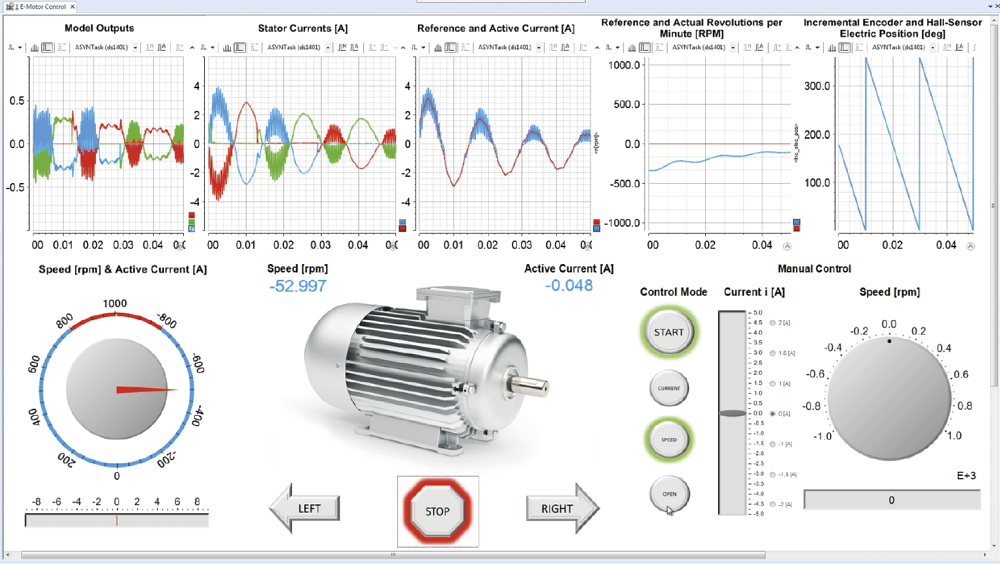
- Main features
ControlDesk provides an environment for your experiment, calibration, measurement, and diagnostic tasks. A variety of features dedicated to data analysis ensure efficient measurement data handling.
For more general information on ControlDesk, refer to Introduction to ControlDesk.
To work with the MicroLabBox II, ControlDesk can be extended with the following tools:
The Signal Editor Module lets you create, configure, display, and manage signals in signal description sets. You can use signal description sets as signal generators to stimulate model variables of real-time applications running on the simulator.
For more information, refer to Introduction to the Signal Editor.
The Bus Navigator Module lets you handle CAN, LIN, and Ethernet PDUs, manipulate PDUs before transmission, exclude them from being transmitted, etc.
For more information, refer to Introduction to the Bus Navigator.
Logging data
ControlDesk lets you log data on a USB mass storage device that is connected to the MicroLabBox II. For more information, refer to Introduction to Data Logging.
Performing scripts synchronously to application tasks
With Real-Time Testing (RTT), you can perform scripts synchronously to tasks of the real-time application.
- Application Areas
Some application areas where real-time testing is useful:
Stimulus without latency
You can access the variables of the real-time application in the same sampling step before or after the real-time application is calculated.
More precise time measurement
There is no latency between time measurement in RTT sequences and the real-time application. The resolution of the measurement depends only on the step size of the simulation.
Signal monitoring without data capture and postprocessing
Because the RTT sequence can read Simulink variables and evaluate conditions containing these variables, there is no need for data capturing and postprocessing on the host PC. Test results can therefore be evaluated online instead of offline.
For more application areas, refer to Application Areas.
- Basic principle
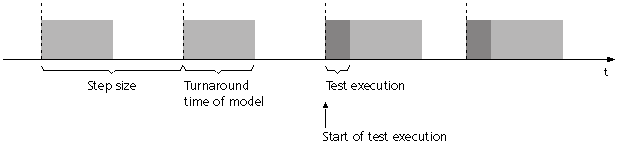
The basis of real-time testing is a Python interpreter running on the MicroLabBox II. The Python interpreter contains special modifications that make it suitable for real-time environments. The MicroLabBox II calls the Python interpreter and executes the test in each sampling step. Executing the Python interpreter requires some processing time as shown in the following illustration.
- More information
For an introduction to the RTT, refer to Introduction to Real-Time Testing.