Typical Workflow for Creating a Real-Time Application
Introduction
A workflow typically used for rapid prototyping scenarios starts with a Simulink model. You use dSPACE ConfigurationDesk to implement the Simulink model in a real-time application for the MicroAutoBox III.
Workflow
This video shows the steps to process a Simulink model on a dSPACE rapid control prototyping (RCP) hardware:
How to modify an existing Simulink model and define interfaces to the hardware.
How to create a ConfigurationDesk project from a Simulink model.
How to configure hardware interfaces in ConfigurationDesk.
How to build a real-time application.
How to load a real-time application to dSPACE RCP hardware.
How to experiment with the application in ControlDesk.
The video uses dSPACE Release 2023-A and a MicroAutoBox III as an example for RCP hardware.
The following workflow shows the standard steps for building a real-time application. The workflow starts with a Simulink model. The Simulink model defines the behavior of the real-time application, such as control algorithms. The Simulink model is called behavior model in ConfigurationDesk.
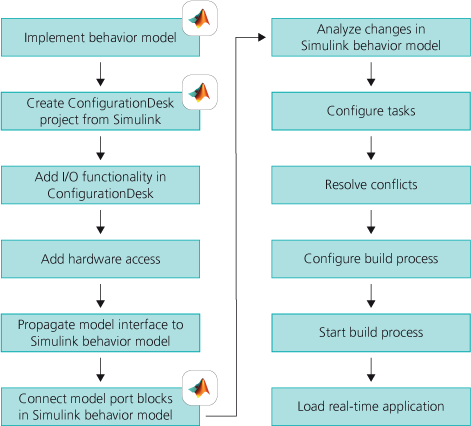
- More information on implementation workflows
For details on the implementation workflow and workflows for other use cases, refer to Typical Workflows for Beginners.
Video introducing the model interface handling
This video shows the following items:
An introduction to the interfaces between the Simulink model and ConfigurationDesk.
How to synchronize the Simulink model interface and the ConfigurationDesk model interface.
How to assign the I/O channels of dSPACE rapid control prototyping (RCP) hardware.
The video uses dSPACE Release 2023-A and a MicroAutoBox III as an example for RCP hardware.