How to Power the MicroAutoBox III
Objective
Connecting the MicroAutoBox III to a laboratory power supply to get started.
Required material
The following material is required to power the MicroAutoBox III:
A laboratory power supply.
The required power and supply voltage that must be provided by the laboratory power supply depends on the installed boards. Refer to the type label at the bottom of the MicroAutoBox III or to General Characteristics.
The CB6073PW power supply cable that is part of the MicroAutoBox III package contents.
Avoiding electrical fire
CAUTION
Operating preconfigured power supply cables above 32 V DC can lead to injuries and/or material damage
An electrical fire might cause personal injury or material damage.
Do not use the preconfigured power supply cable from dSPACE at supply voltages > 32 V DC.
For operation with DC voltages > 32 V DC, you must build a power supply cable. For building a power supply cable, refer to Building the Power Supply Cable.
Always replace a defective fuse of the preconfigured power supply cable by a fuse with the same ratings.
Method: To power the MicroAutoBox III
Allow the electronic components to acclimate for at least two hours after transport. Condensation may form on cold surfaces after electronic components are set up indoors. The moisture can lead to short circuits, causing property damage.
Make sure that the laboratory power supply is switched off.
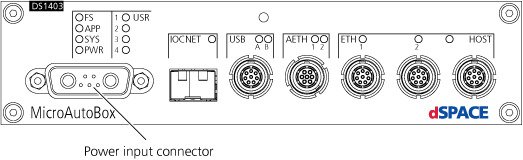
Connect the Sub-D connector of the CB6073PW power supply cable to the Power input connector of the MicroAutoBox III.
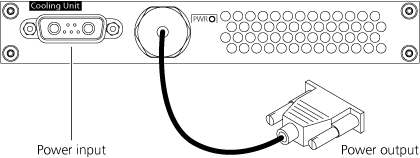
If you use a MicroAutoBox III with a built-in Cooling Unit, the power input connector of the Cooling Unit is used to power the MicroAutoBox III.
Make sure that the power output connector of the Cooling Unit is connected to the power input connector of the DS1403.
Connect the CB6073PW cable to the power input connector of the Cooling Unit.
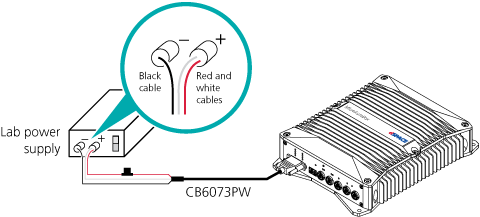
Connect the wires to the laboratory power supply as follows:
Connect the red wire and the white wire to the positive pole.
Connect the black wire to the negative pole.
Result
You connected the power supply to the MicroAutoBox III. Switching on the laboratory power supply also switches on the MicroAutoBox III.
Next step
You can now connect the MicroAutoBox III to the host PC via Ethernet. Refer to How to Connect the MicroAutoBox III Directly to the Host PC.