Step 3: How to Continue the Development Process in ConfigurationDesk
Objective
Exporting the build result to develop the application further in ConfigurationDesk. ConfigurationDesk lets you configure the dSPACE hardware and build the real-time application.
Method: To continue the development process in ConfigurationDesk
In the FPGA Model subsystem, open the dialog of the FPGA Setup block and switch to its Interface tab.
Select Create New Project and Application and click Publish FPGA Container to ConfigurationDesk Project and wait.

Result
The FPGA Programming Blockset published the built FPGA container file to the artifact folder of the newly created ConfigurationDesk project.
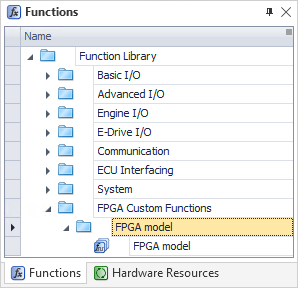
The following illustration shows the Function Browser in ConfigurationDesk with the FPGA model function block type.
Next steps
In ConfigurationDesk, you perform the steps to execute your application on the dSPACE real-time hardware.
To familiarize with the workflow in ConfigurationDesk, refer to Tutorial Starting with Simulink.