Software Tools for Working with the FPGA Programming Blockset
Introduction
To model and build an FPGA application for dSPACE hardware, several software tools are necessary.
Tools from The MathWorks®
The following tools from The MathWorks are required:
MATLAB®, Simulink® and Simulink® CoderTM for modeling and simulating the application.
Only for offline simulation of the DS6602 DDR4 RAM: Fixed-Point DesignerTM
The following tools from The MathWorks are optional:
In addition to the Word Length Calculator of the FPGA Programming Blockset, you can use the Fixed-Point Designer to optimize the use of fixed-point data types. Using fixed-point data types reduces the FPGA utilization of your application.
HDL CoderTM can be used to generate VHDL code from parts of the FPGA model that use Simulink blocks. HDL Coder is not required if you use only the HDL library of the AMD Vitis Model Composer for the functionality of the FPGA model.
Simulink Report GeneratorTM to generate an HTML model of the FPGA model.
The backup process of the FPGA Programming Blockset can automatically back up the Simulink model of the entire model. In addition, you can specify that a web view (HTML model) of the Simulink model is generated to display the entire model in any Internet browser. Refer to Configuring the Backing Up of Build Results.
For compatibility information, refer to Supported software versions.
Tools from AMD
AMD provides several tools for designing applications for AMD FPGAs. The Vivado® Design Suite covers all the aspects of designing FPGAs. Working with the FPGA Programming Blockset requires the following products:
- Vivado Design Suite
The Vivado Design Suite provides a logic design environment for AMD FPGAs. It contains tools and wizards, for example, for I/O assignment, power analysis, timing-driven design closure, and HDL simulation. With the Vivado software, you can build the FPGA application according to the implemented FPGA model.
The FPGA Programming Blockset uses the Vivado software in the background without the GUI.
- AMD Vitis Model Composer
AMD® VitisTM Model Composer for modeling FPGA applications with Simulink is the unified AMD add-on for MATLAB Simulink.
The following items of the AMD Vitis Model Composer are required for modeling and generating the FPGA application:
The AMD Vitis Model Composer Blockset.
The AMD Vitis Model Composer Blockset is a Simulink block library that lets you graphically model FPGA applications. The AMD Vitis Model Composer Blockset requires a separate license.
The FPGA Programming Blockset supports only the HDL library of the AMD Vitis Model Composer.
The code generator that is included in the AMD Vitis Model Composer.
The code generator is used to generate the HDL code based on blocks of the FPGA Programming Blockset and the AMD Vitis Model Composer Blockset.
Tip
To use the AMD Vitis Model Composer with a specific MATLAB version, the
-matlab "<matlabdir>"parameter must be specified. You can add this parameter to the Vitis Model Composer icon on the desktop, for example.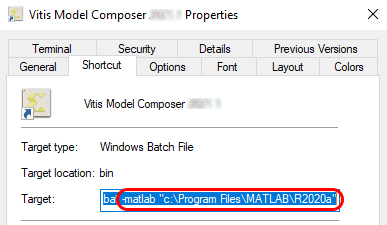
- Ordering AMD software
Currently, you cannot order the AMD software from dSPACE.
Supported software versions
The following table shows you the supported products and their software versions for the current version of the FPGA Programming Blockset.
Design Tool Version | MATLAB® Version | Operating System |
|---|---|---|
AMD® VivadoTM 2025.11) |
| Windows operating system that is supported by the RCP and HIL software of the current Release. For a list of supported operating systems, refer to Operating System. The listed Windows Server operating systems are not supported by AMD® VivadoTM. |
In general, VivadoTM ML Enterprise edition and the AMD® VitisTM Model Composer are needed. The VivadoTM ML Standard edition with AMD® VitisTM Model Composer can also be used for the DS2655 (7K160) and DS6601 FPGA base boards.
For software versions that are compatible with older versions of the FPGA Programming Blockset, refer to https://www.dspace.com/faq?295.
- MATLAB compatibility
The limited MATLAB compatibility reflects the requirements of the AMD Design Tools and its impacts on the building processes for creating an FPGA application.
In contrast to the FPGA build process, the blocksets and tools for modeling and building the processor application support the regular MATLAB compatibility of a dSPACE Release. Therefore, you can extend the MATLAB compatibility if you model and build the processor application separately from the FPGA application. The only requirement is that the same dSPACE Release is used to build the FPGA application and the processor application.
For example: The FPGA application is created with an installation set containing the current dSPACE Release, VivadoTM 2025.1, and MATLAB R2025a. You can transfer and import the generated FPGA application to an installation set containing the current dSPACE Release and MATLAB R2026a to continue your work with ConfigurationDesk or the Processor Interface sublibrary of the FPGA Programming Blockset.
Required blocksets for the processor model
The MicroLabBox II, MicroAutoBox III, and SCALEXIO require the dSPACE Model Interface Package for Simulink to implement the interface between the real-time processor and the FPGA. The Model Interface Package for Simulink is the blockset for specifying all interfaces of processor models (behavior models) used in ConfigurationDesk.
ConfigurationDesk
ConfigurationDesk is the required dSPACE implementation tool for the MicroLabBox II, MicroAutoBox III, and SCALEXIO system. ConfigurationDesk lets you implement I/O functionality, bus communication, and the connection to processor models and FPGA applications. ConfigurationDesk is used to build the real-time application that includes the FPGA application and runs on the MicroLabBox II, MicroAutoBox III, or SCALEXIO.
ControlDesk
ControlDesk is the dSPACE software tool for experimenting with a dSPACE system. It can be used to register the connected hardware, to manage the simulation platform, to download the real-time application (processor and FPGA application), and to control the experiment. The great variety of instruments allows you to access and visualize variables of the processor application.