Step 2: How to Open the Demo Model
Objective
Opening the demo model for copying parts of the model used in the tutorial.
Method: To open the demo model
In the MATLAB Command Window, enter
rtifpga.The FPGA Programming Blockset opens.
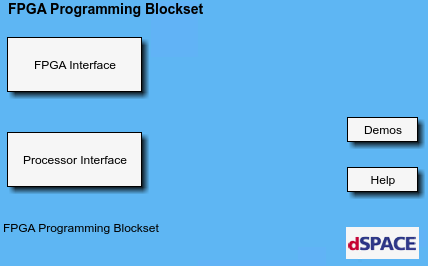
If the FPGA Interface is not available, the FPGA license is not activated. Refer to Step 1: How to Install the Required Software.
Double-click Demos - DemoFPGApipt1 - DS6601_XCKU035.
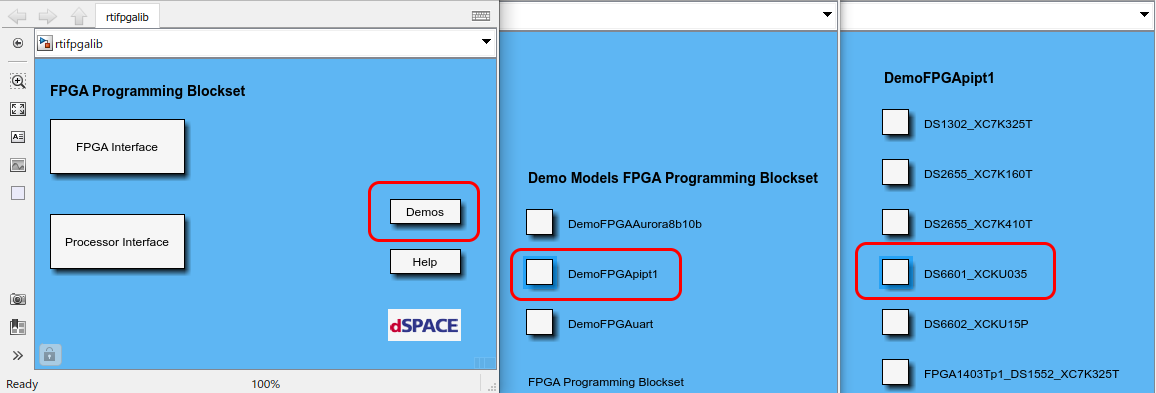
A dialog opens.
Click Yes to copy the demo model file to the current MATLAB folder.
The demo model opens and another dialog opens.
Click Yes to copy the ControlDesk experiment to the current folder.
After all files have been copied, the demo model opens.
Result
You copied demo model to the current MATLAB folder and opened the model. You can now copy parts of the demo to use in the tutorial.
Next step
For the next step, refer to Step 1: How to Select the Framework for the dSPACE Platform.