Step 2: How to Prepare the Processor Model Separation
Objective
Preparing the Simulink model so that the framework can separate the processor model from the FPGA model. The separation is required to use the processor model with ConfigurationDesk.
Method: To prepare the processor model separation
Click Model Port Blocks - Open Model Interface Blockset.
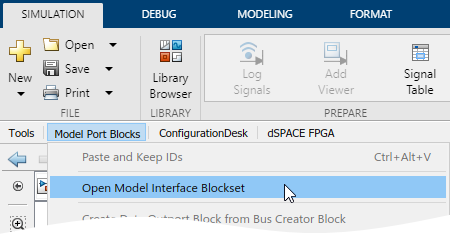
The dSPACE Model Interface Blockset opens.
Add the Model Separation Setup block from the Model Interface Package for Simulink to the top-level of the Simulink model.
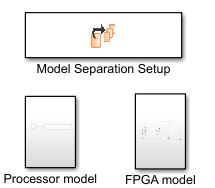
Open the dialog of the Model Separation Setup block.
The Model Separation Setup block analyzes the entire model and displays all top-level subsystems that can be separated as models.
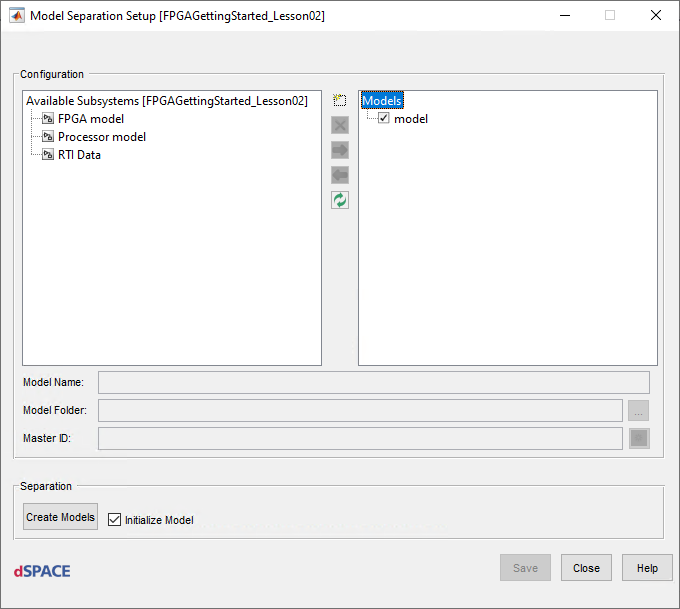
Select model.
In the Model Name edit field, enter
TutorialProcessorModelas the name for the processor model to be separated.Clear the Model Folder edit field.
The framework saves the separated processor model to the folder of the entire model.
From the Available Subsystems list, select the Processor model subsystems and click
 to assign the subsystems to the model entry.
Click Save to save the configuration to the source model followed by Close to close the dialog.
Save the Simulink model as
FPGAGettingStarted_Lesson03.slx.
Result
You prepared the separation of the processor model from the entire model.
Next step
For the next step, refer to Step 3: How to Continue the Development Process in ConfigurationDesk.