Panes of the ControlDesk User Interface Used in the Tutorial
Illustration
The following illustration displays ControlDesk's user interface and shows the panes you will use in this tutorial.
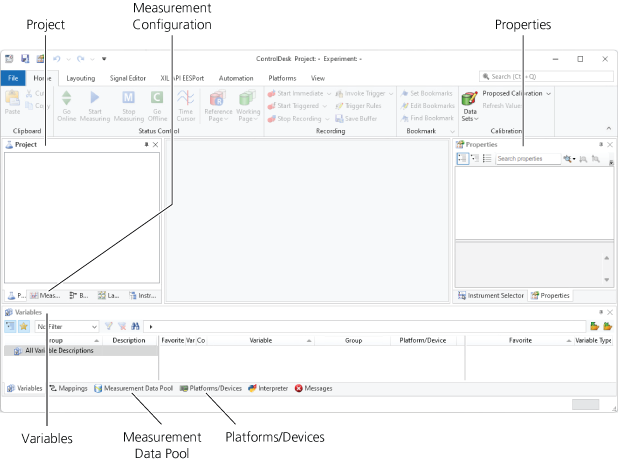
- Measurement Configuration
A pane that allows you to configure measurement, recording and data logging.
- Measurement Data Pool
A pane that provides access to measurement data recorded in measurement data files.
- Platforms/Devices pane
A pane that provides functions to handle devices, platforms, and the applications assigned to the platforms.
- Properties pane
A pane providing access to the properties of, for example, platforms/devices, layouts/instruments, and measurement/recording configurations.
- Variables pane
A pane that provides access to all the variable descriptions and calculated variables of the currently open experiment.
Calculated variable
A scalar variable that can be measured and recorded and that is derived from one or more input signals.
The following variable types are supported as input signals:
Measurement variables
Single elements of measurement arrays or value blocks
Scalar parameters
Scalar elements of structs
Other calculated variables
Note
ControlDesk blocks the creation of ring dependencies with multiple calculated variables.
Ring dependency example: CV_1 references CV_2 as an input signal, and CV_2 references CV_1 as an input signal.
ControlDesk performs the computation of calculated variable values according to a user‑defined computation formula that uses one or more input signals.
Calculated variables are represented by the  symbol.