Working with Referenced Artifacts
Introduction
A ConfigurationDesk application contains exchangeable components for use in creating a signal chain. Each component type is provided via a specific file type, for example, hardware topology files (HTFX files), Simulink model files (SLX files), or model implementation container files (SIC, FMU, BSC files). As of dSPACE Release 2026-A, ConfigurationDesk provides a new concept for file handling.
Referenced artifacts concept
With this concept, the files (= artifacts) for the components of a ConfigurationDesk application can be stored outside of the ConfigurationDesk project folder and its application subfolders. ConfigurationDesk therefore no longer uses application-specific copies of the files. The original files are always referenced by ConfigurationDesk.
- Usage and organization of artifact folders
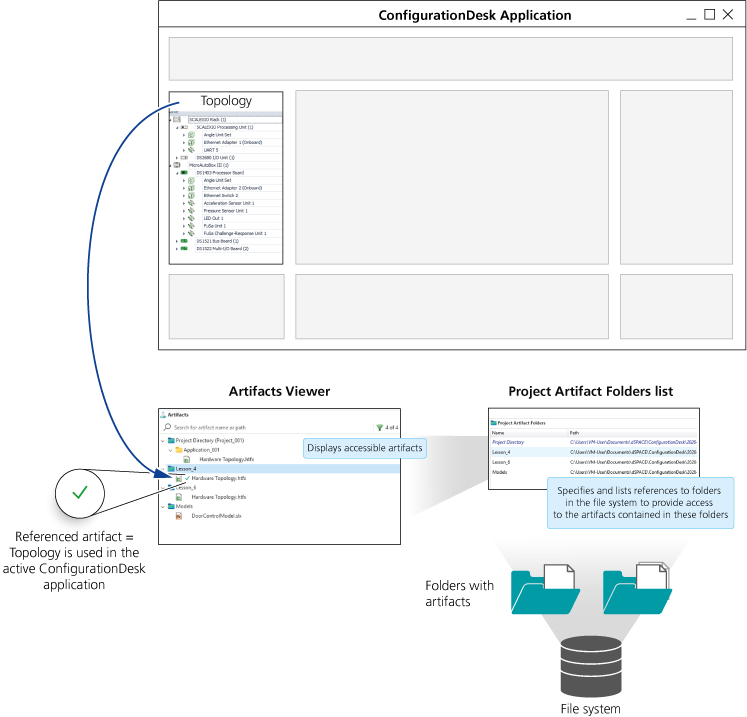
To use and organize artifacts in ConfiguationDesk projects, ConfigurationDesk provides a project-specific Project Artifact Folders list. Here you can add folders from the file system to make them available as storage locations from where ConfigurationDesk later lets you add files in an easy and convenient way. You can add folders that contain the artifacts, but also one of their parent folders.
You can define your own symbolic names for the artifact folders to get a better overview, for example, to identify folders with certain artifact types more quickly.
- Display of artifacts in the Artifacts Viewer
As shown in the illustration below, all supported artifacts that can be accessed by ConfigurationDesk are displayed in the Artifacts Viewer. These artifacts can now be used by the active ConfigurationDesk application. If an artifact is used, it becomes a referenced artifact. In the illustration below, the referenced artifact is a topology as an example.
Monitoring of referenced artifacts
Referenced artifacts are monitored by ConfigurationDesk to inform you about changes to their content or to their accessibility. For example, the following helpful states can be displayed:
Invalid: The referenced artifact is missing or inaccessible because it has been moved or renamed.
Outdated: The referenced artifact is accessible, but its content has been changed outside of ConfigurationDesk.
In this case, you can use a reload functionality to update the outdated artifact and to make the changes available in ConfigurationDesk.
Building a real-time application
With the referenced artifacts concept, ConfigurationDesk automatically updates an outdated model implementation container (SIC, FMU, BSC files) during the build process. Thus, the latest version of the referenced container file is used for the build process. It is no longer necessary to reload outdated model implementation container files manually beforehand.
Providing files via version control systems
With the artifact handling based on referenced files, ConfigurationDesk now provides better support for usage of version control systems like Git. For example, you can save a local copy of a repository in a storage location that ConfigurationDesk can access. You can then add the local repository as an artifact folder to a ConfigurationDesk project.