Overview of Licenses
Overview
These are the available licenses to use the license-protected features of ConfigurationDesk:
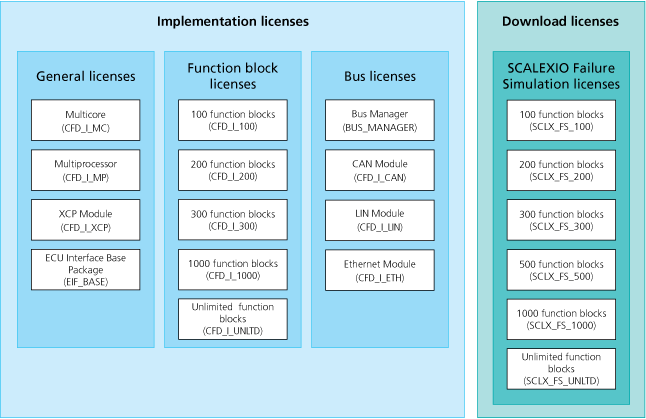
General licenses
The following general licenses are available:
ConfigurationDesk MultiCore
This license (CFD_I_MC) is required if you want to implement an application that employs two or more processor cores. This applies in the following cases:
You want to implement a multimodel application with several application processes.
Your application contains an application process that employs two or more processor cores (Number of required processor cores property ≥ 2).
If you want to implement a multimodel application with one application process that employs only one processor core, i.e., you do not want to build a multicore or multi-processing-unit (multi-PU) application, one of the function block licenses (CFD_I_xxx) is sufficient.
ConfigurationDesk MultiProcessor
This license (CFD_I_MP) is required if you want to implement a multimodel application and build a multi-processing-unit (multi-PU) application. Note that the CFD_I_MC license is also required for multi-PU applications. If you purchase the CFD_I_MP license, the shipment automatically includes the CFD_I_MC license.
ConfigurationDesk XCP Module
This license (CFD_I_XCP) is required if you want to configure an XCP service for accessing Simulink® models via A2L/XCP.
ECU Interface Base Package
This license (EIF_Base) is required if you want to implement applications which contain at least one ECU Interface Configuration function block to import an ECU interface container (EIC) file.
Function block licenses
At least one function block license (CFD_I_xxx) is required to implement and use function blocks in your application. A function block license works as a basic license and enables you to use the basic implementation features of ConfigurationDesk.
They are available in different sizes for different numbers of instantiated function blocks in your ConfigurationDesk application. For details, refer to Notes on Function Block Licenses.
Bus licenses
The following licenses for bus communication are available:
Bus Manager
This license (BUS_MANAGER) is required if you want to implement bus communication via ConfigurationDesk's Bus Manager.
ConfigurationDesk - CAN Module
This license (CFD_I_CAN) is required when you use a CAN function block, for example, in the following cases:
You want to implement CAN communication via imported ECU interface container (EIC) files or added BSC files.
You use ConfigurationDesk's Bus Manager and you want to implement CAN communication.
ConfigurationDesk - Ethernet Module
This license (CFD_I_ETH) is required if you want to implement Ethernet communication via the following Ethernet function blocks: Data Streaming Ethernet Setup, UDP Data Replay, UDP Receive, UDP Transmit, TCP, PTP Master, PTP Slave.
ConfigurationDesk - LIN Module
This license (CFD_I_LIN) is required when you use a LIN function block, for example, in the following cases:
You want to implement LIN communication via added BSC files.
You use ConfigurationDesk's Bus Manager and you want to implement LIN communication.
FIU licenses
The FIU licenses are download licenses and must be available on the host PC with dSPACE software that you use to load and handle the real-time application. For example, this also can be a PC on which ControlDesk is installed.
At least one SCALEXIO Failure Simulation license (SCALEXIO_FIU_xxx) is required to use failure simulation of a SCALEXIO system. For more information, refer to Notes on SCALEXIO FIU Licenses.
Solution licenses
Add-ons (dSPACE Solutions) are available for ConfigurationDesk. If these solutions are license-protected, the corresponding licenses must be available on your host PC to work with the solution.
dSPACE Solutions is a collective term for various dSPACE software products that can be installed and used as add-ons to the standard products such as ConfigurationDesk. Solutions cover special use scenarios that go beyond the standard use of dSPACE products.
Enabling licenses
Two different license types (single-user license, floating network license) are available for working with ConfigurationDesk depending on your order:
Single-user licenses: With single-user licenses, the dSPACE software is protected by a license mechanism based on a dongle. The dongle must be connected to your host PC to use the license-protected features of ConfigurationDesk.
Floating network licenses: With floating network licenses, the dSPACE License Client automatically requests the license required by a particular action from the connected dSPACE License Server (automatic activation). If there is at least one instance of each required license available, you can continue working with the dSPACE software as usual. At the same time, the license is blocked for other clients.
Invalid licenses
A license becomes invalid when the dongle is removed from the PC or the required license is not available on the dSPACE License Server, for example. If you now try to carry out a license-protected action, an error message is displayed. However, you can save the ConfigurationDesk application.