Application Components and Their Changeability
Overview of components
An application is the basis for carrying out tasks in ConfigurationDesk. A ConfigurationDesk application can contain the following exchangeable components (written in bold letters):
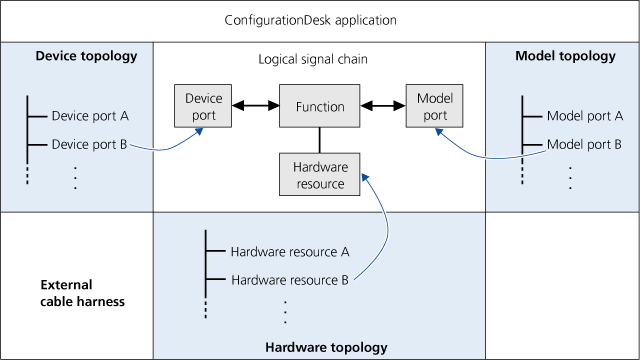
Definition of topologies
A topology serves as a repository for creating a signal chain. All the elements of a topology can be used in the signal chain, but not every element needs to be used. A topology can be used in several applications.
Description of components
- Device topology
Represents the interface of your external devices in ConfigurationDesk, such as your ECU to be tested. The topology includes details of the available device pins and their characteristics.
The device topology can be created in ConfigurationDesk or added from a specific file type (DTFX file) or the XLSX Microsoft Excel™ file format (up to ConfigurationDesk 26.2).
- Model topology
Contains information on the interface to the behavior model, such as the specified model port blocks and their ports. In a multimodel application, the model topology can contain interface information on several behavior models.
The model topology can be created in ConfigurationDesk or established by analyzing the model interfaces of a behavior model that is added to the ConfigurationDesk application.
- Hardware topology
Contains information on a specific hardware system that can be used with ConfigurationDesk. It provides information on the components of the system, such as channel types and slot numbers.
The hardware topology can be created in ConfigurationDesk, scanned automatically from the registered hardware, or added from a specific file type (HTFX file).
- External cable harness
Contains the wiring information for the external cable harness. The external cable harness is the connection between the I/O connectors of the real-time hardware and the devices, such as the ECUs to be tested.
The wiring information can be calculated by ConfigurationDesk or imported from a specific file type (ECHX file) so that you can reuse an existing cable harness.
Interchangeability of components
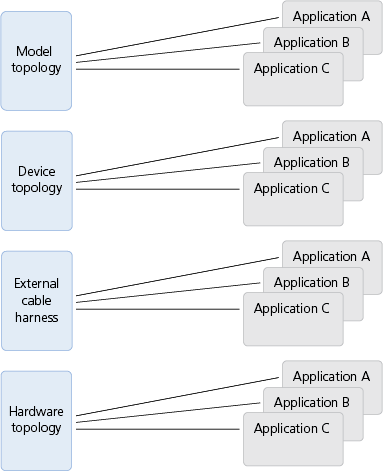
Each component type is provided via a specific file type and can be used separately in different ConfigurationDesk applications. ConfigurationDesk allows you to export, replace, add, and remove them depending on the component type.
As shown below, you can use each component in several applications. For example, you can use one behavior model (model topology) in different applications.
As shown in the following illustration, you can replace the components of an application. For example, you can use an application for different behavior models (represented by different model topologies).
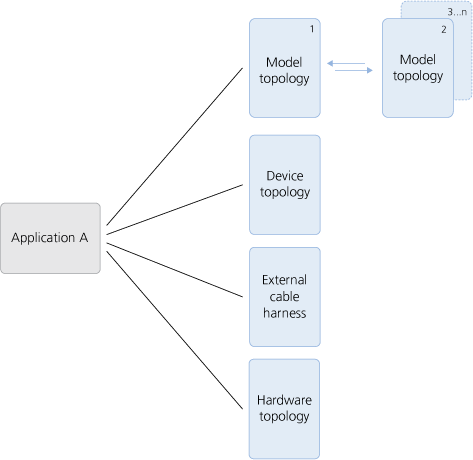
Using multiple device and hardware topologies (as of ConfigurationDesk 26.3)
A ConfigurationDesk application can contain multiple artifact references for device topologies and hardware topologies. Working with multiple topologies can be useful, for example, in scenarios where you want to combine several external devices and/or hardware systems in one ConfigurationDesk application.