How to Identify Accessible Licenses
Objective
To work with an application of the BusManagerTutorial project, all of the required licenses must be available and accessible.
Precondition
The BusManagerTutorial project is open.
Method: To identify accessible licenses
On the File ribbon, click Licenses.
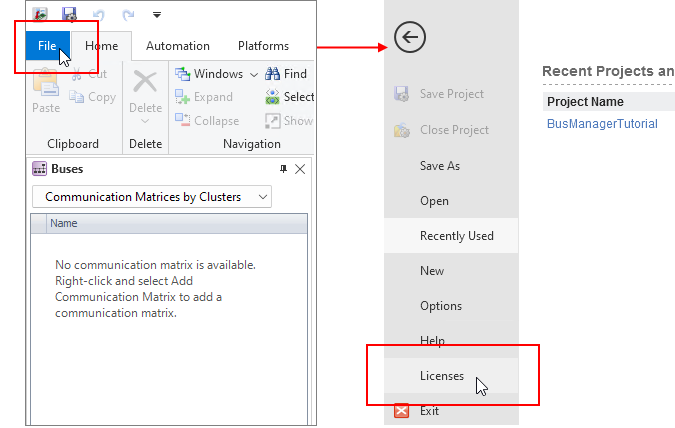
The Licenses page opens, displaying a license overview and the license status, e.g., whether a license is accessible or in use in the active ConfigurationDesk application.
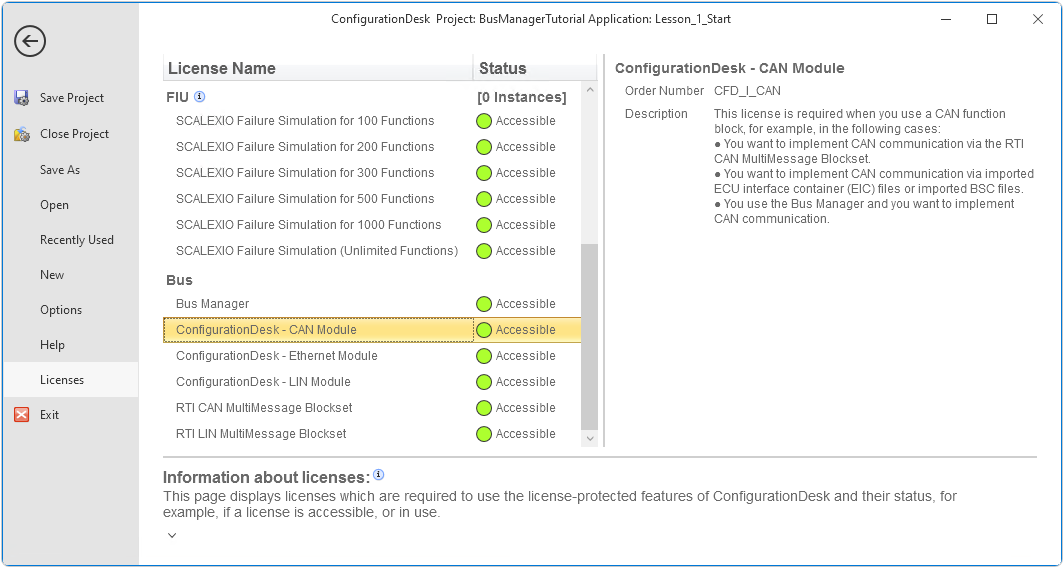
Result
You opened the Licenses page, which lets you identify the accessible licenses.
To work with the Bus Manager, the Bus Manager license (BUS_MANAGER) is mandatory. The additional required licenses for working with the BusManagerTutorial project depend on the specific tutorial lesson. For an overview of the required licenses, refer to Overview of Lessons.
Tip
You can request evaluation licenses to complete this tutorial with the Bus Manager. For more information, contact dSPACE Support (www.dspace.com/go/supportrequest).