Step 1: How to Assign Communication Matrix Elements to the Manipulation Part of a Bus Configuration
Objective
To manipulate bus communication, you have to assign communication matrix elements to the Manipulation part of a bus configuration.
Method: To assign communication matrix elements to the Manipulation part
Switch to the Buses view set, if necessary.
Select the Bus Configurations table.
The Restbus_BusConfiguration, including its parts, is displayed.
In the Buses Browser, select Communication Matrices by ECUs.
The communication matrix elements are sorted by ECUs.
In the Buses Browser, expand the CentralGatewayEcu node.
The PDUs that are transmitted and received by the CentralGatewayEcu are displayed
Tip
All the PDUs are already used in the bus configuration. Therefore, the chain symbol (
 ) is displayed for the PDUs.
Click the Direction column to sort the PDUs by their direction.
The sorting order is indicated by an arrow (
 ) in the column header.
Select all the PDUs with the RX direction and drag them to the Manipulation part of the Restbus_BusConfiguration.
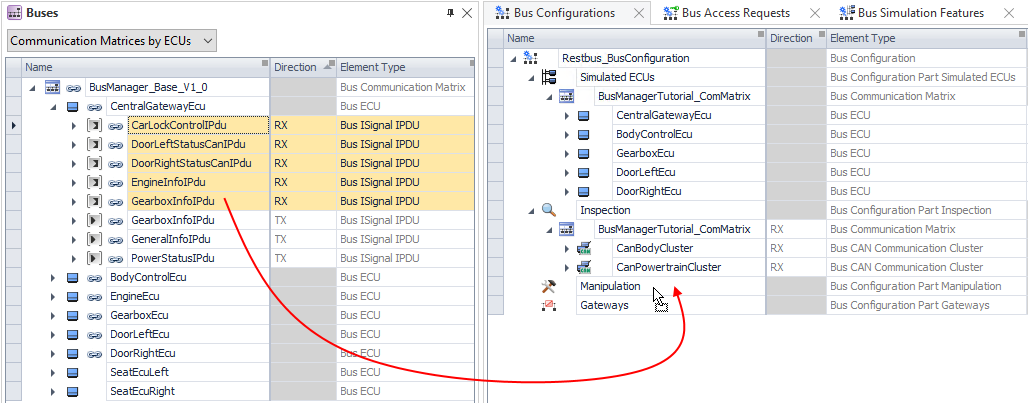
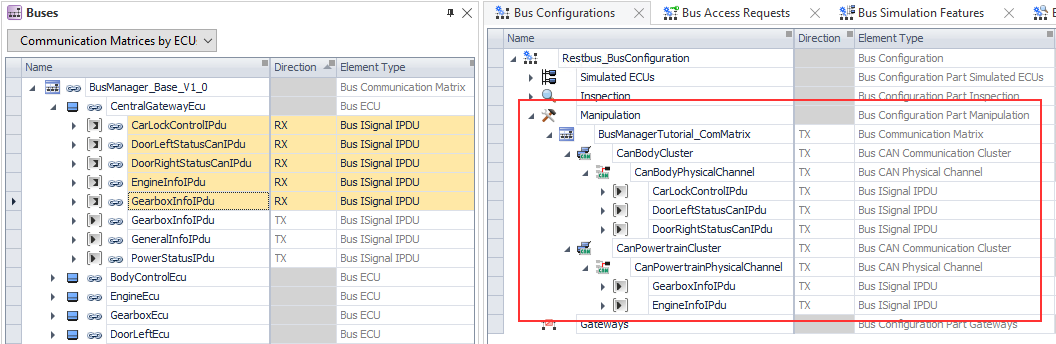
All the PDUs and ISignals that are received by the CentralGatewayEcu are assigned to the Manipulation part.
Manipulating bus communication applies to the bus communication that is transmitted via a communication cluster, regardless of the involved sending and receiving ECUs. Therefore, the elements are assigned in the context of the communication cluster and their direction is TX.
Tip
For assigned elements, the Related TX ECUs and Related RX ECUs columns of the Bus Configurations table display the sending and receiving ECUs as specified in the communication matrix.
Result
You assigned the PDUs and ISignals that are received by the CentralGatewayEcu to the Manipulation part of the bus configuration. This lets you manipulate the PDUs and ISignals before they are transmitted on the bus and received by the CentralGatewayEcu.
The name of the communication matrix node that is available for the Manipulation part is derived from the communication matrix nodes that are available for the Simulated ECUs and Inspection parts. Therefore, it was not necessary to change the name of the communication matrix node in this step.
Tip
The names of communication matrix nodes that are available for the same communication matrix in a bus configuration are automatically synchronized.
What's next
In the next step, you will add bus configuration features to elements of the Manipulation part to configure bus communication for manipulation purposes.