Step 2: How to Create an Application Process that Provides a Default Task
Objective
To work without a behavior model, you have to manually create at least one application process and task. You can do this in one step by creating an application process that provides a default task.
Method: To create an application process that provides a default task
Switch to the Tasks view set.
The Task Configuration table is displayed.
Right-click an empty area in the Task Configuration table and select New - Application Process (Providing Default Task) on the context menu.
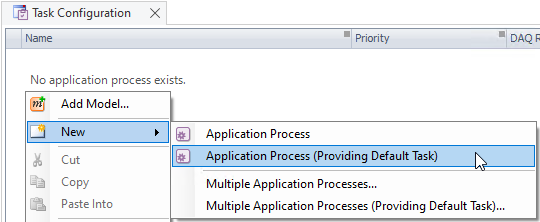
An application process and a default task with default names and default settings are created.
In the Name column of the Task Configuration table, change the name of the application process to Restbus_ApplicationProcess.

Result
You created an application process and a default task, which is a periodic task. The default settings of the application process and the task are sufficient in most use cases.
You renamed the application process. Specifying meaningful names for application processes is especially useful if you want to generate bus simulation containers because BSC files are named after the related application processes.
What's next
In the next step, you will manually assign the Restbus_BusConfiguration to the application process.