Step 2: How to Check the Communication Matrix for Conflicts
Objective
To ensure that there are no severe faults in the communication matrix, you should check it for conflicts after you added it to the ConfigurationDesk application.
Method: To check the communication matrix for conflicts
Select the Conflicts Viewer.
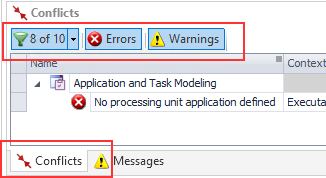
The Conflicts Viewer displays all conflicts of a ConfigurationDesk application. You can enable and disable the display of conflicts via filters. Selected filters are highlighted in blue.
Tip
The selection of filters is stored locally on the host PC and applies to all ConfigurationDesk applications. The selection is preserved even when you close ConfigurationDesk or the Bus Manager (stand-alone). Therefore, the selected filters in your ConfigurationDesk application might differ from the selected filters displayed above.
Make sure that the Errors and Warnings filters are selected: If a filter is not highlighted in blue, click the filter to select it.
Click the expand arrow of the context set filter.
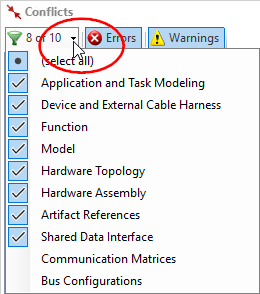
The context sets are displayed. All conflicts of a ConfigurationDesk application are assigned to specific context sets. Conflicts of communication matrices are assigned to the Communication Matrices context set. Conflicts are displayed only if the related context set is selected. Selected context sets are indicated by a check mark.
Tip
The selection of the context sets is stored locally on the host PC and applies to all ConfigurationDesk applications. The selection is preserved even when you close ConfigurationDesk or the Bus Manager (stand-alone).
If you work with the Bus Manager (stand-alone), not all of the context sets that are displayed above are available.
The Shared Data Interface context set is available only as of Bus Manager 26.3.
Select the Communication Matrices context set.
Click the expand arrow to close the context set filter.
The Communication Matrices context set is selected. One communication matrix conflict is displayed.

Communication matrix conflicts have no effects on building a real-time application or generating bus simulation containers. In most cases, you therefore do not have to resolve them. However, if you assign conflicting communication matrix elements to a bus configuration, bus configuration conflicts occur, which might affect the build process or the generation of bus simulation containers.
Independently of the assigned elements, the following communication matrix conflicts might result in unintended behavior at run time:
Failed consistency checks during import of communication matrix
Failed schema check during import of communication matrix
If these conflicts occur, it is recommended to resolve them before you assign elements to bus configurations. Because the displayed communication matrix conflict is not one of these two conflicts, you do not have to resolve it.
Tip
When you select the communication matrix node in the Buses Browser, the Properties Browser displays the Consistency state and Schema validation state properties. The property values indicate whether the communication matrix successfully passed the consistency and schema checks during the import.
You will resolve the communication matrix conflict in lesson 2.
If the Application and Task Modeling context set is selected, the Conflicts Viewer displays a conflict that affects the build process and the generation of bus simulation containers. You will automatically resolve this conflict by configuring the bus communication in the following lessons.
Click the context set filter.
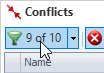
All context sets are cleared and the Conflicts Viewer displays no conflicts.
Result
You checked the communication matrix for conflicts. Then, you disabled the display of all conflicts.
Note
Displaying conflicts can significantly influence the performance of the ConfigurationDesk application. Depending on the complexity of the bus communication, this especially applies to Bus Manager-related conflicts. It is therefore recommended to display conflicts only when and as long as required.
What's next
In the next step, you will add a bus configuration to the ConfigurationDesk application.