Step 5: How to Analyze the Simulink Model in the ConfigurationDesk Application
Objective
To make changes in the Simulink® model available in ConfigurationDesk or the Bus Manager (stand-alone), you have to analyze the model in the ConfigurationDesk application.
Methods in this step
Note
If you use the Bus Manager in ConfigurationDesk, you can analyze the Simulink model via the ConfigurationDesk menu of the model. This is not possible if you use the Bus Manager (stand-alone).
Depending on your Bus Manager variant, select one of the following methods:
Method 1: To analyze the Simulink model when using the Bus Manager in ConfigurationDesk
In the Simulink Editor, click ConfigurationDesk - Analyze Model in ConfigurationDesk (Including Task Information).
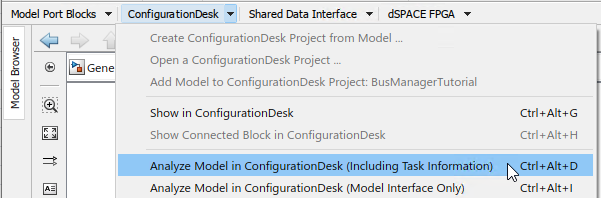
The Simulink model is analyzed in the ConfigurationDesk application. When the analysis is finished, Ready is displayed in the status bar of the Simulink Editor.
Skip the following method and continue with the result of this step. Refer to Result.
Method 2: To analyze the Simulink model when using the Bus Manager (stand-alone)
Switch to the Bus Manager (stand-alone).
Select the Model Browser.
In the Model Browser, right-click the Generated_Restbus_Model_User1 node and select Analyze Simulink Model (Including Task Information) on the context menu.
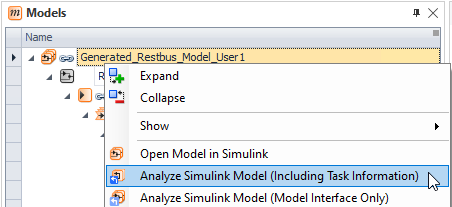
The model is analyzed and the Message Viewer provides information on the analysis process.
Result
You analyzed the Simulink model including its task information in the ConfigurationDesk application. This synchronizes the model interfaces.
Tip
During the model analysis including task information, the Simulink Update Diagram functionality is automatically executed and the model is checked for errors.
What's next
In the next step, you will generate a Simulink implementation container from the Simulink model and replace the model with the container in the ConfigurationDesk application.