Step 3: How to Add a Bus Configuration to the ConfigurationDesk Application
Objective
To configure bus communication for simulation, inspection, and manipulation purposes, you have to add one or more bus configurations to the ConfigurationDesk application.
Method: To add a bus configuration to the ConfigurationDesk application
Right-click in an empty area of the Bus Configurations table and select New - Bus Configuration on the context menu.
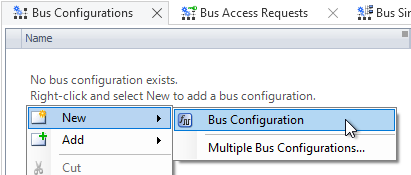
A new bus configuration is added to the ConfigurationDesk application.
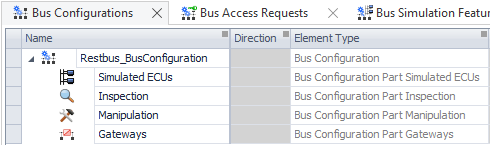
In the Name column of the Bus Configurations table, select Bus Configuration (1) and change the name to Restbus_BusConfiguration.
Result
You added a new bus configuration to the ConfigurationDesk application and changed its default name. The Bus Configurations table displays the bus configuration and its Simulated ECUs, Inspection, Manipulation, and Gateways parts.
What's next
With this step, you finished the lesson. For a summary of the lesson and for more information, refer to Result of Lesson 1.