Step 2: How to Add Bus Configuration Features for Manipulation Purposes
Objective
To configure bus communication for manipulation purposes, you have to add bus configuration features to elements that are assigned to the Manipulation part of a bus configuration.
Part 1: To add bus manipulation features to PDUs
Select the Bus Manipulation Features table.

The PDU Features subview is active, displaying all PDUs that are assigned to the Manipulation part of bus configurations.
Click the Name column header to sort the PDUs alphabetically.
The sorting order is indicated by an arrow (
 ) in the column header.
Select the CarLockControlIPdu and GearboxInfoIPdu and set Suspend Frame Transmission to Enabled.

The Suspend Frame Transmission feature is added to both PDUs. Because this is the first manipulation feature that is added to the PDUs, the Countdown Start Value column is enabled for both PDUs. This lets you specify an initial value for the number of times to manipulate the PDUs at run time.
For the CarLockControlIPdu, set Frame Length to Enabled.

The Frame Length feature is added to the PDU. This enables the Length - Frame Length and Padding Value - Frame Length columns for the PDU, which let you configure the feature-specific manipulation behavior of the Frame Length feature.
Interim result
You added bus manipulation features to PDUs. You can now add bus manipulation features to ISignals. Continue with the next part.
Part 2: To add bus manipulation features to ISignals
In the Bus Manipulation Features table, select the Signal Features subview.
All ISignals that are assigned to the Manipulation part of bus configurations are displayed.
Click the Name column header to sort the ISignals alphabetically.
Select the DoorLeftLockedISignal, DoorRightLockedISignal, and SpeedISignal.
For the selected ISignals, set ISignal Overwrite Value to Enabled.
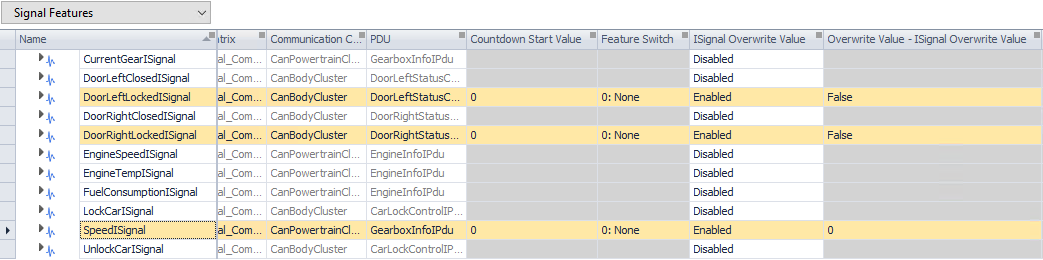
The ISignal Overwrite Value feature is added to the selected ISignals. This enables the Countdown Start Value, Feature Switch, and Overwrite Value - ISignal Overwrite Value columns for the ISignals. The Countdown Start Value and Feature Switch columns let you specify the initial run-time behavior for manipulating the ISignals. The Overwrite Value - ISignal Overwrite Value column lets you specify an initial value to overwrite the original ISignal value at run time.
For the SpeedISignal, set ISignal Offset Value to Enabled.
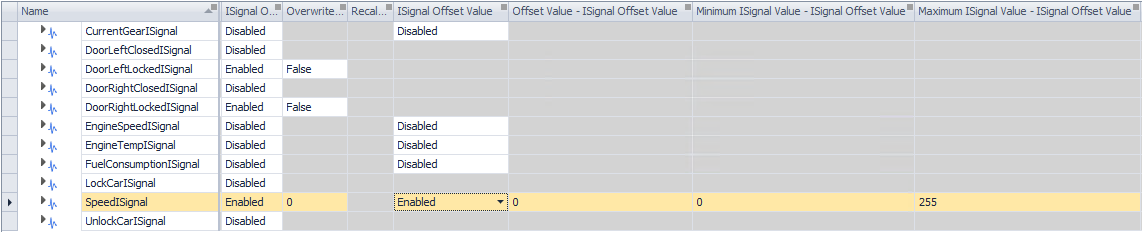
The ISignal Offset Value feature is added to the ISignal. This enables the Offset Value - ISignal Offset Value, Minimum ISignal Value - ISignal Offset Value, and Maximum ISignal Value - ISignal Offset Value columns for the ISignal, which let you configure the feature-specific manipulation behavior of the ISignal Offset Value feature.
Result
You added bus configuration features to PDUs and ISignals that are assigned to the Manipulation part of the bus configuration.
What's next
In the next step, you will configure the run-time behavior for manipulating the PDUs and ISignals.