Step 2: How to Specify the Hardware Access for Bus Configurations
Objective
To specify the hardware access for bus configurations, you have to assign the bus access requests to bus accesses, i.e., to bus function blocks (CAN, LIN). To access bus channels of real-time hardware, you have to assign hardware resources to the bus function blocks.
You can manually and/or automatically assign bus access requests to bus accesses. In this step, you will automatically assign all the bus access requests of the Restbus_BusConfiguration to bus accesses.
Part 1: To automatically assign bus access requests to bus accesses
Select the Bus Access Requests table.

The Bus Access Requests table displays the bus access requests of all bus configurations.
In the Bus Access Requests table, select the Restbus_BusConfiguration.
On the Home ribbon, click
 .
All the bus access requests of the Restbus_BusConfiguration are automatically assigned to bus accesses, i.e., to suitable bus function blocks (CAN, LIN).
Completely expand the CAN and LIN nodes.
The lowest level of the table displays the bus function blocks that are assigned to the bus access requests of the bus configuration. The function blocks were newly added to the signal chain and they are named after the related communication cluster.
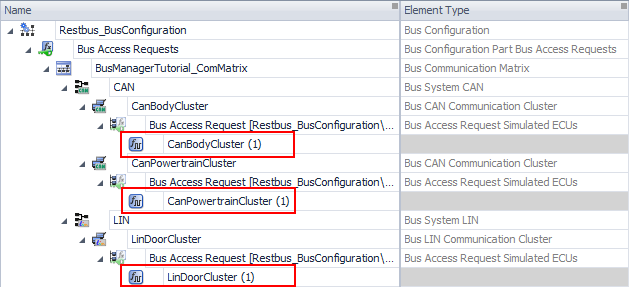
Interim result
You automatically assigned the bus access requests of the Restbus_BusConfiguration to bus accesses. You can now assign hardware resources to the bus function blocks. Continue with the next part.
Part 2: To assign hardware resources to bus function blocks
In the Hardware Resource Browser, expand the DS2680 I/O Unit.
The modules of the DS2680 I/O Unit are displayed.
Expand the DS2672 Bus Module to the channels of the CAN 1 and LIN 1 channel types.
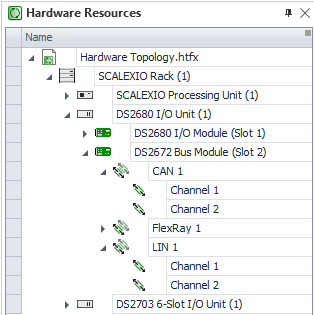
Select Channel 1 of the LIN 1 channel type and drag it to the LinDoorCluster (1) node in the Bus Access Requests table.
In the Hardware Resource Browser, the assignment of Channel 1 is indicated by a chain symbol. In the Bus Access Requests table, the Channel column displays the assigned channel for the LinDoorCluster (1) function block. Moreover, the Assigned Channel Set column displays the assigned channel set. The channel set is displayed with the following syntax:
<Board or module name> (<location on carrier>)\<channel type name> [<location in system>].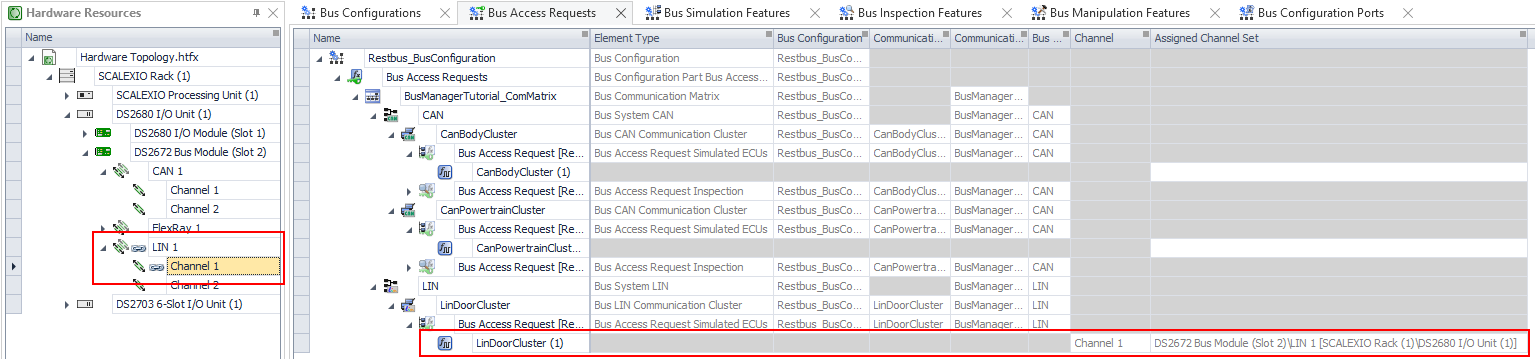
Assign hardware resources to the remaining bus function blocks as follows:
Channel Type
Channel
Bus Function Block
CAN 1
Channel 1
CanBodyCluster (1)
CAN 1
Channel 2
CanPowertrainCluster (1)
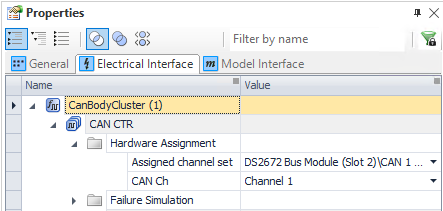
In the Bus Access Requests table, select the CanBodyCluster (1) node.
The Properties Browser displays the properties of the CAN function block:
The General page displays the function block type and the requirements of the assigned bus access request.
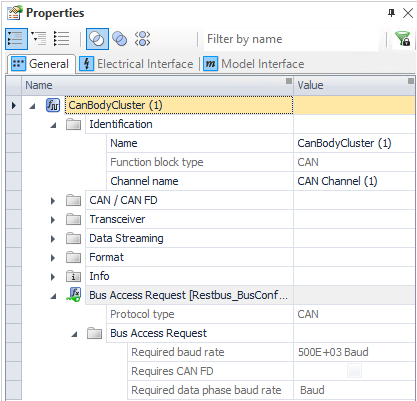
The Electrical Interface page displays the assigned hardware resource.
Result
You specified the hardware access by automatically assigning all the bus access requests of the Restbus_BusConfiguration to suitable bus accesses, i.e., CAN and LIN function blocks. Then, you assigned hardware resources to the function blocks.
What's next
In the next step, you will build a real-time application.