Step 1: How to Open a Prepared Custom Library
Introduction
Tip
If you created your own custom library in lesson 4, you can skip this step.
If the UsingBasicElementsLib custom library is not open yet, you can copy the library that is included in the AutomationDesk demo projects to your working folder.
First, open the prepared library.
Part 1: To open a prepared custom library
On the Library ribbon, click Custom Library - Open Custom Library to open the dialog.
Navigate to
<DocumentsFolder>\Tutorial Demos.Select the UsingBasicElementsLib.adlx file and click Open.
Continue with next part
You opened a prepared custom library in the Library Browser. Now you can save it to your working folder. This avoids that you overwrite the demo version of the custom library when you proceed with this lesson.
Part 2: To save the prepared custom library for working
In the Library Browser, right-click UsingBasicElementsLib to open the context menu and choose Save as to open the dialog.
Navigate to your working folder, for example,
<DocumentsFolder>\MyWorkingFolder.Type
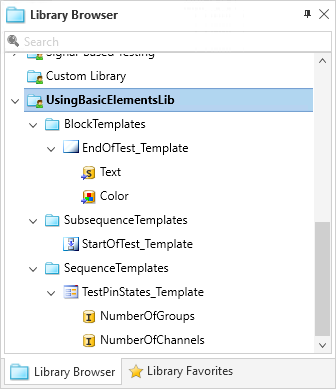
UsingBasicElementsLibin the File name edit field and click Save.The Library Browser now contains the custom library elements that you created in the previous lesson.
What's next
Now you can use the library's templates in your project. The next step shows how to use block templates in your sequences.