Results of Lesson 4
Results
If you have performed all of the previous steps, your Library Browser contains a custom library called UsingBasicElementsLib. In its library folders the custom library provides an automation block template, a subsequence template, and a complete sequence as a template.
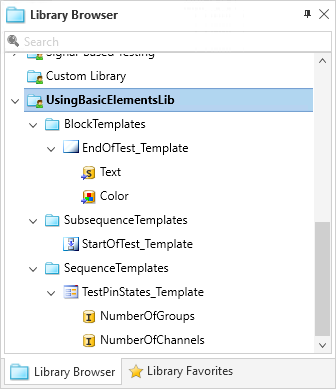
We have learned that you can drag automation elements from the Sequence Hierarchy Browser to a custom library folder of the Library Browser's custom library node.
You can maintain specified properties and data objects (directly set and referenced).
You can modify the properties of the automation templates directly.
You must save the created custom library explicitly to make it available for further AutomationDesk sessions.
If you want to make your custom library available to your colleagues, you must provide a copy of certain files, for example, on a network drive.
Further information
For detailed information about the commands used, refer to Commands And Dialogs.
For detailed information about the automation blocks used, refer to Automation Blocks.
For information about the basic principles of AutomationDesk and a detailed description of creating user libraries, refer to Working with Custom Libraries.
What's next
The next lesson shows you how to build sequences using this custom library.