Results of Lesson 3
Results
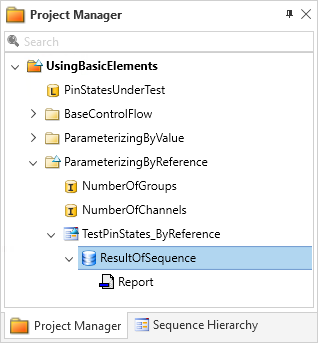
If you have performed all the steps as described in this lesson, your AutomationDesk project has 2 new elements accessible in the Project Manager:
The result of the sequence’s execution as a child element of the TestPinStates_ByReference sequence.
The report as a child element of the ResultOfSequence element.
You have learned how to execute an automation sequence.
If required, you can generate a report from the results. By specifying the report parameters, you define which attributes of the executed sequence should also be included in the report. The report can be generated as an HTML file or as a PDF file.
Prepared Demo
If you want to compare your results with the result we wanted to achieve, you can look at the prepared demo project Tutorialdemo03.adpx. You can find it at <DocumentsFolder>\Tutorial Demos.
Further information
For detailed information about the commands used, refer to Commands And Dialogs.
For detailed information about the automation blocks used, refer to Automation Blocks.
For information about the basic principles of AutomationDesk and a detailed description of executing automation sequences, refer to Executing Automation Sequences.
What’s next
The next lesson shows you how to create custom libraries. If it is not your job to create custom libraries, you can skip that lesson and continue with the following one, where working with custom libraries is explained. Refer to Lesson 5: Working With the Custom Library.