Step 1: How to Execute a Sequence
Introduction
In this lesson you will execute the TestPinStates_ByReference sequence you created during the previous lessons.
The execution of a sequence is started from within the Platform Manager. You can execute the sequence on different levels of the project tree, which is on the project's root element, on a folder's node, or on a sequence's node. When execution is started, all sequences that are below the execution's starting point are executed and their information is passed to the result.
You can also store a brief description of the execution for information.
You will now start the execution of your TestPinStates_ByReference sequence. You will execute it on the sequence's level, so only this single sequence will be executed.
Tip
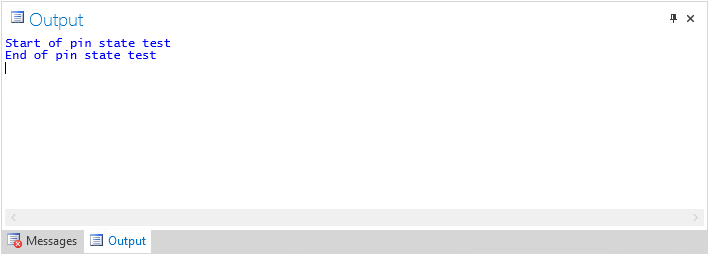
You should open the Output Viewer by clicking the Output page in the Tool Window before you start the execution. At run time you can watch the output of the sequence's print commands in the Output Viewer.
Note
Automation blocks that use COM objects, for example, most of those from the ModelDesk Access library, should not be executed individually.
Method: To execute a sequence
In the Project Manager, click TestPinStates_ByReference to select your sequence.
On the Home ribbon, click Execution - Execute to open the Execution Configuration dialog.
Check the Display data object value updates option. This lets you observe the changing of the data object values in the Sequence Builder during the execution of the sequence.
Check the Create result option. It is set by default. If you want to execute a sequence without logging any data, you can clear this checkbox.
Rename the default result name by entering
ResultOfSequencein the Result name edit field.Type
This is the the first run of the sequence.in the Description edit field.Clear the Generate report checkbox. The configuration and the generation of a report will be described in detail in the steps 3 and 4 of this lesson.
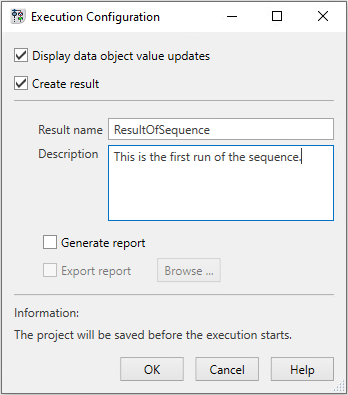
Click OK to confirm the parameter settings and start the execution.
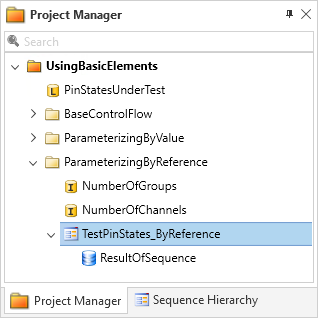
At the execution's start, a result node is created as a child element of the starting point in the project tree.
The Output page shows the execution's output.
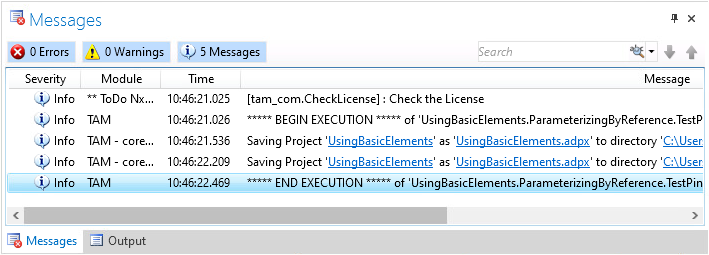
The execution is protocolled in the Message Viewer.
What’s next
You can generate a report based on the execution result. This will be done in the next step.