Step 4: How to Parameterize Automation Blocks by Value
Introduction
Having created the control flow, you will now learn how to parameterize the automation blocks in your sequence.
There are two methods of doing this:
By value
The parametrization is specified locally in data objects that are provided by the automation blocks. This method is shown in the current step.
By reference
The parameterization is specified via a reference to a project-specific data object. This method is shown later in the next step.
For both methods, parameterization is specified using the Data Object Editor.
First the For blocks are parameterized with the number of iterations necessary to process the groups and channels of the test task.
Part 1: To parameterize the control flow blocks by value
In the Sequence Builder, select the ForAllGroups block.
In the Data Object Editor, the parameterization of the selected block is displayed.
The default values in the Value column fit to the test case of two channel groups:
Start =
1Stop =
2Step =
1
In the Data Object Editor, select the Current data object and rename the data object to
CurrentGroup.
This distinguishes the Current data objects of the inner and the outer For block.
In the Sequence Builder, select the ForAllChannels block.
In the Data Object Editor, overwrite the default values in the Value edit field to parameterize that each group consists of 4 channels:
Start =
1Stop =
4Step =
1
In the Data Object Editor, select the Current data object and rename the data object to
CurrentChannel.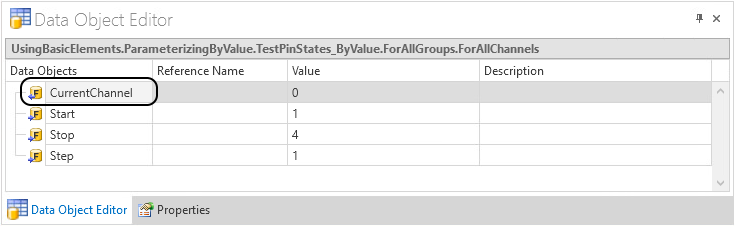
Continue with next part
You parameterized the For blocks of your sequence by value.
In the next part, you add blocks to the sequence that announce the start and the end of sequence processing in the Output Viewer.
Part 2: To add blocks for printing
Open the TestPinStates_ByValue sequence in the Sequence Builder.
In the Library Browser, select the Print block in the Basic Elements folder of the Main Library.
From the Library Browser, drag a Print block to the Sequence Builder and drop it above the ForAllGroups block.
Rename the new Print block to
PrintStartOfTest.In the same way, add a Print block below the ForAllGroups block and rename it to
PrintEndOfTest.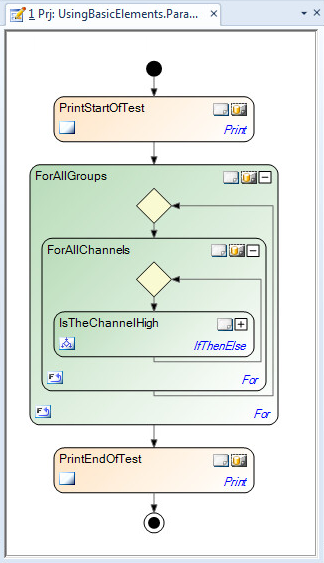
Continue with next part
You added blocks to the sequence that print messages. In the next part, you parameterize these blocks by value with the text to be printed and the color to be used for this.
Part 3: To parameterize the blocks for printing
In the Sequence Builder, select the PrintStartOfTest block.
In the Data Object Editor, the parameterization of the selected block is displayed.
In the Data Object Editor, specify the message to be printed by entering the following text in the Value edit field of the Text data object:
Start of pin state testIn the Value edit field of the Color data object, select Blue from the list to specify the color of the message to be printed.
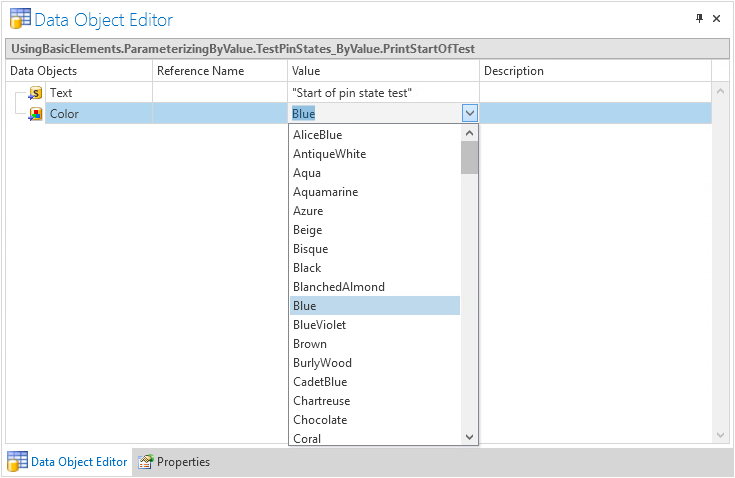
For the PrintEndOfTest block, specify the following message to be printed in blue:
End of pin state testTip
As an alternative for specifying a value in the Data Object Editor, you can double-click the data object's element to open the data object in the Value Editor. The appearance of the Value Editor depends on the type of data object that you edit.
What’s next
In this step, you parameterized automation blocks by the value of their local data objects.
In the next step, you learn how to parameterize blocks by referencing to project-specific data objects.