Step 3: How to Modify Automation Block Properties
Introduction
This step explains how to modify the general properties of an automation block. You can change its name, which is used in the Sequence Builder, to make the sequence clearer. You can store a brief description of the block for information.
Tip
By copying the sequence, the properties of the source's automation blocks are assigned to the automation blocks of the copy.
Besides the name and description properties, there are other automation block properties which will be described later on in the tutorial.
Now you will rename several automation blocks in your sequence. You will get to know different ways of doing this.
Part 1: To rename automation blocks using the Properties pane
In the Project Manager, double-click the TestPinStates_ByValue sequence to open it in the Sequence Builder and the Sequence Hierarchy Browser.
In the Sequence Builder, select the outer For block of the sequence.
The selected block is marked with a red frame.
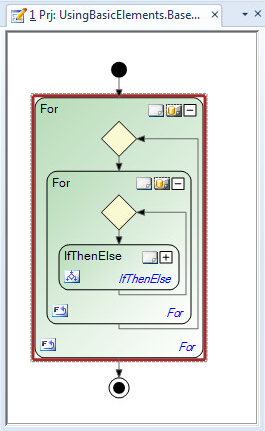
In the Properties pane, the properties of the selected automation block are shown.
Adjust the size of the pane to display all properties of the For block.

In the edit field for the General - Name property, overwrite the current name of the automation block by typing
ForAllGroups. When you press Enter the change is applied to the Sequence Builder and the Sequence Hierarchy Browser.
Continue with next part
You renamed the outer For block. You can now rename the inner For block in the next part.
Part 2: To rename automation blocks by clicking the block name in the Sequence Builder
In the Sequence Builder, select the inner For block of the sequence.
Click the block name and change it to
ForAllChannels.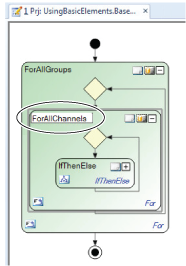
Continue with next part
You renamed the inner For block. You can now rename the IfThenElse block.
Part 3: To rename an automation blocks using F2 in the Sequence Hierarchy Browser
In the Hierarchy Browser, select the IfThenElse element, press F2 and rename it to
IsTheChannelHigh.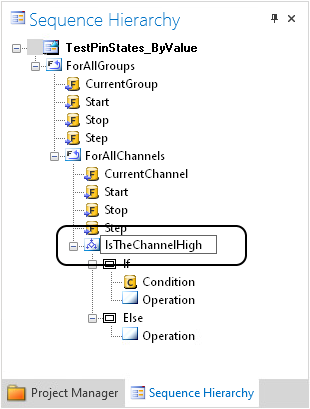
Continue with next part
Having renamed several automation blocks in your sequence, you will now store brief descriptions of some blocks in the next part.
Part 4: To specify an instance description of an automation block
In the Sequence Builder, select the ForAllGroups block.
In the Properties pane, enter
Passes through the output groupsin the Instance Description edit field.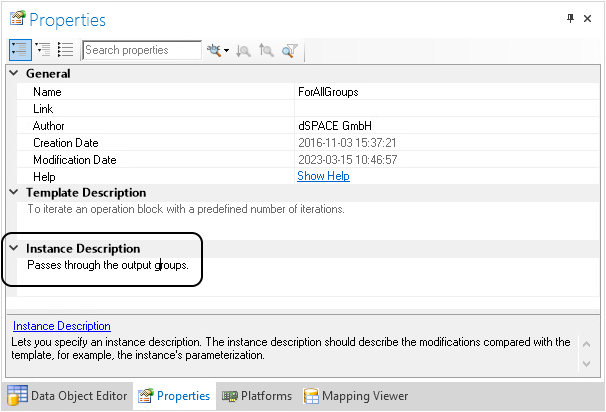
Modifying other elements
If you want, you can edit the descriptions of the other sequence elements on your own.
What’s next
You can now start parameterizing the automation blocks in your sequence in the next step.