Step 5: How to Navigate In the Sequence
Introduction
In this step you will learn how to navigate in a sequence.
A detailed hierarchical view of the sequence you are editing in the Sequence Builder is provided in the Sequence Hierarchy Browser. It shows the internal structure of your control flow. To display the Sequence Hierarchy Browser, click the Sequence Hierarchy page.
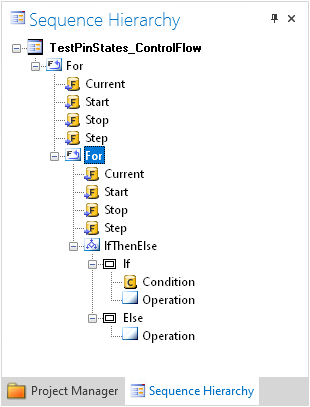
To focus on the essential parts of the sequence, you can reduce its complexity by collapsing subordinated elements. To recover the detailed view, you can expand it again.
Part 1: To collapse an element
In the Sequence Hierarchy Browser, collapse the node of the element you want to get an abstract view of, for example, the IfThenElse block.
The collapsed element is presented with a
 icon in the Sequence Builder.
Tip
You can also collapse an element in the Sequence Builder. There are two ways to do this:
Double-click the element you want to mask in the Sequence Builder.
Click
 in the command bar of the element you want to collapse.
Continue with next part
You collapsed an element in your sequence. You can now expand it again with in the next part.
Part 2: To expand an element
In the Sequence Hierarchy Browser, expand the node of the element you want to get a detailed view of.
Tip
You can also expand an element in the Sequence Builder. There are two ways to do this:
Double-click the collapsed element in the Sequence Builder.
Click
in the command bar of the element you want to expand.
What’s next
You can save your project in the next step.