Scope of Project‑Specific Data Objects
Introduction
The data object of an automation block can be parameterized in different ways.
Basics
The data object of an automation block can be set by a local value or by a reference. While a directly set value (local value) belongs to only the current automation block, a source data object can be referenced by any automation block that is within the current hierarchy path. By using project‑specific data objects for data referencing, you can parameterize your sequences centrally in the Project Manager. Project‑specific data objects can also be accessed via the AutomationDesk API.
Data object set by value
You can parameterize the value of an automation block's data object in the Value column of the Data Object Editor. This value belongs to only the current automation block.
Data object set by reference
You can parameterize the value of an automation block's data object by specifying a data object name in the Reference name column of the Data Object Editor. Then, the value is resolved with the value of the first data object with the specified name within the current object hierarchy path.
The root of the object hierarchy is always the current project. Below that follows the optional folder structure that you can create in the Project Manager. The next lower level contains the interface of the sequence the current automation block resides in. Below the interface, you can add more levels by using the automation blocks that implement the control flow of the sequence, such as a Serial block.
AutomationDesk searches for the referenced data object from lower to higher levels until it finds a data object with the specified name.
Data objects that are visible in the Project Manager are called project-specific data objects. They can also be accessed via the AutomationDesk API.
You can also use a data object reference for an output data object. The referenced data object will contain the current value of the block's output during execution and can be used by other automation blocks as an input value.
When you work with referenced data, you must know the scope of data objects. This is described in the following example.
Example
You have created a project with two identical sequences that reside in two project folders. The LocalInt data object and the LocalFloat data object in the sequences' interfaces refer to data objects that are named MyInt and MyFloat as shown in the following illustration.
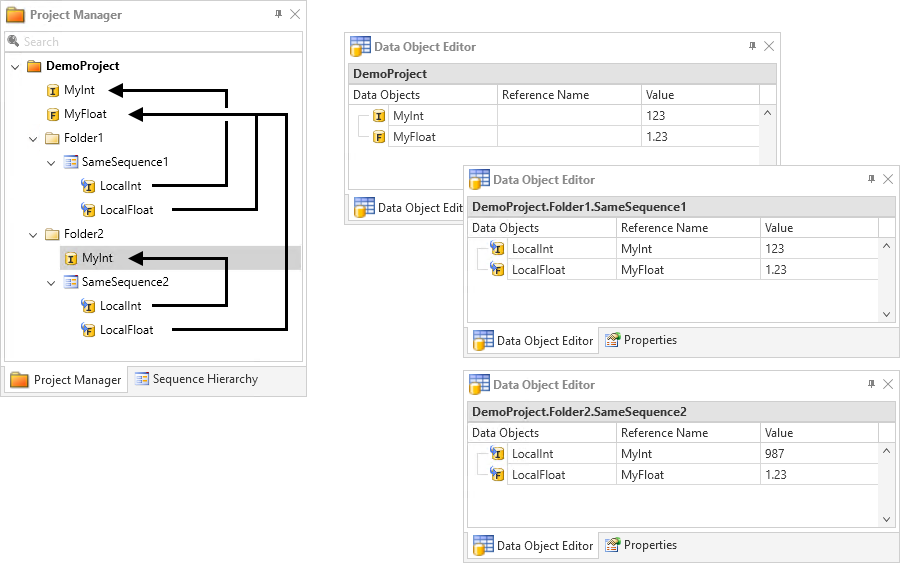
When SameSequence1 is executed, AutomationDesk first tries to resolve the reference names MyInt and MyFloat in Folder1. Because this fails, the reference resolution is tried in the next higher level, where it succeeds.
When SameSequence2 is executed, AutomationDesk first tries to resolve the reference names MyInt and MyFloat in Folder2, where it succeeds for MyInt. Because it fails for MyFloat, the reference resolution is tried in the next higher level, where it succeeds.