Step 2: How to Use a Block Template and a Subsequence Template
Introduction
In this step, you reuse the block and the subsequence that are provided by the custom library as templates. You can integrate them as linked instances in your sequences by dragging their library elements to the related position in your control flow.
This way, you can implement similar sequences quickly and easily by assembling them from reusable templates.
Method: To use block templates and subsequence templates
In the Project Manager, create a new folder and rename it to
UsingTemplates.In the new folder, create a new sequence and rename it to
UsingBlockTemplates.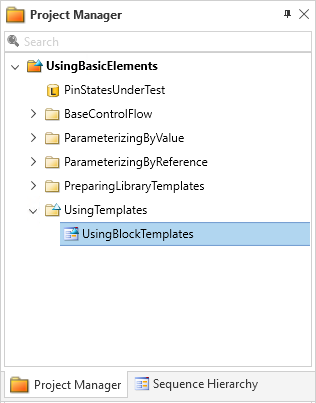
Double-click the new sequence to open it in the Sequence Builder.
From the UsingBasicElementsLib custom library, drag StartOfTest_Template to the Sequence Builder
A new block of the type StartOfTest_Template is created.
Rename the new block to StartOfTest.
Drag an EndOfTest_Template to the Sequence Builder.
A new block of the type EndOfTest_Template is created.
Rename the new block to EndOfTest.
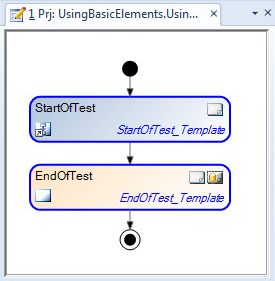
Result
When you execute this sequence, a start message and an end message is printed in blue to the Output Viewer.
When you generate a report, the list that represents the output pins of the device is included.
What's next
You used block templates and subsequence templates in your sequence.
In the next step, you learn how to use a template that provides a complete sequence.