Step 2: How to Add the Test Sequence
Introduction
The Signal-Based Testing library provides the TestCase sequence template in which the standardized test scenario is already coded.
Before you can parameterize and execute such a test case, you must instantiate the sequence template by adding it to your project. Then you can parameterize the sequence with references to the data objects that you created in the previous step.
Method: To add the test sequence
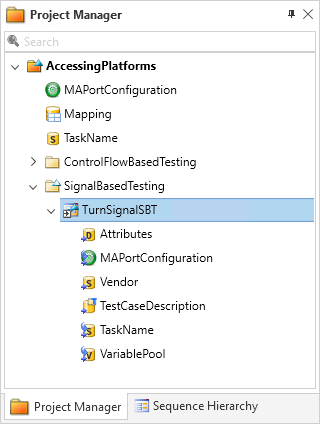
In the Project Manager, add a new folder to your tutorial project and rename it to
SignalBasedTesting.From the Signal-Based Testing library, drag a TestCase sequence template to the SignalBasedTesting folder and rename it to
TurnSignalSBT.A test case sequence is added to your project.
In the Data Object Editor, specify the project-specific data objects MAPortConfiguration and TaskName as the references for the sequence-specific data objects that have the same names.
This parametrizes the platform access of the sequence.
Specify the project-specific Mapping data object as the reference for the sequence-specific VariablePool data object.
This parameterizes the model paths of the variables to be accessed.
Result
You added the test sequence to your project that implements a standardized test scenario and parameterized it.
What’s next
You can now configure the test case by specifying the involved signals in the test case description. The next step describes how to do this.