Results of Lesson 7
Results
If you have performed all the steps in this lesson, the turn-signal simulation application is running on the platform you registered.
You created the AccessingPlatform AutomationDesk project that contains data objects to configure the access to the simulation application running on the platform.
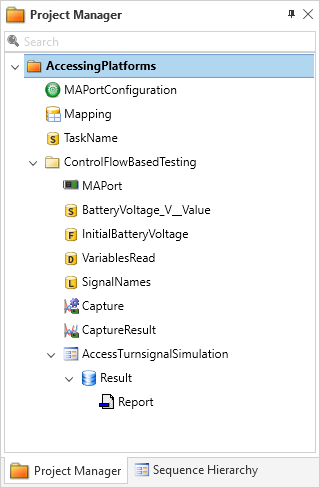
You have learned how to write one single variable and how to read several variables at once. For this, the model paths of the variables to be accessed are configured in strings.
You have also learned how to capture variable values for a specified duration. For this, the model paths to be accessed are collected in a variable mapping that is implemented in a Mapping data object.
In the AccessTurnSignalSimulation sequence, you implemented a scenario where the turn-signal lever is switched to the right and back and the state of the front lights is captured.
Executing this sequence leads to the following report.
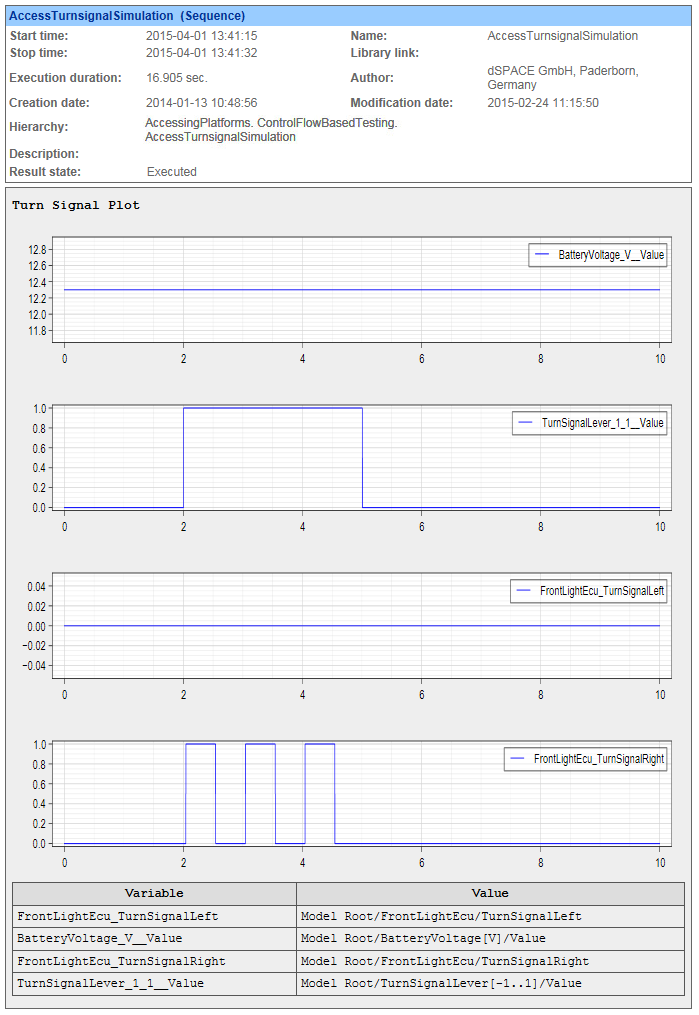
You can see that the turn-signal lever is switched after 2 seconds for a duration of 3 seconds and the front right turn-signal reacts correctly to the state of the turn-signal lever.
Prepared Demo
If you had problems while working through this lesson, or if you want to compare your results with the result we wanted to achieve, you can look at the prepared demo project Tutorialdemo07.adpx in <DocumentsFolder>\Tutorial Demos.
While this lesson describes the handling with a DS1006 Processor Board, the prepared demo is configured for VEOS as platform.
Using other platforms
You can also work through this lesson if you do not have the same real-time hardware as used here. If you use other dSPACE real-time hardware or VEOS, note that:
The dialogs to register a platform vary slightly according to the platform type and the way it is connected to the host PC. For more information, refer to Registering and Managing dSPACE Platforms.
For platform-specific details on registering a platform, refer to Register Platforms.
For platform-specific details on loading and starting a simulation application on DS1104 and MicroAutoBox II , refer to Load. If you want to load and start the simulation application on VEOS, SCALEXIO, DS1202 MicroLabBox, MicroLabBox II, or MicroAutoBox III, refer to Load and Start.
The task names of the turn-signal simulation application depend on the platform type, as shown in the following table.
Platform Type
Task Name
DS1202 MicroLabBox
HostService
MicroLabBox II
MicroAutoBox
MicroAutoBox III
SCALEXIO System
VEOS
Periodic Task 1
DS1202 Multicore System
masterAppl/HostService
SCALEXIO Multicore System
SCALEXIO Multiprocessor System
VEOS Multicore
masterAppl/Periodic Task 1
Running demo without a platform
If no platform is available to you, you can execute this demo in offline operation mode, i.e., the demo's sequence works with included sample data. For more information on operation modes, refer to Basics of Operation Modes.
Further information
For detailed information about the commands used, refer to Commands And Dialogs.
For detailed information about the automation blocks used, refer to Automation Blocks.
For more information on using the XIL API Convenience library, refer to Accessing Simulation Platforms via the XIL API Convenience Library.
What's next
The next lesson shows you how to implement access to a platform via signal-based testing.